
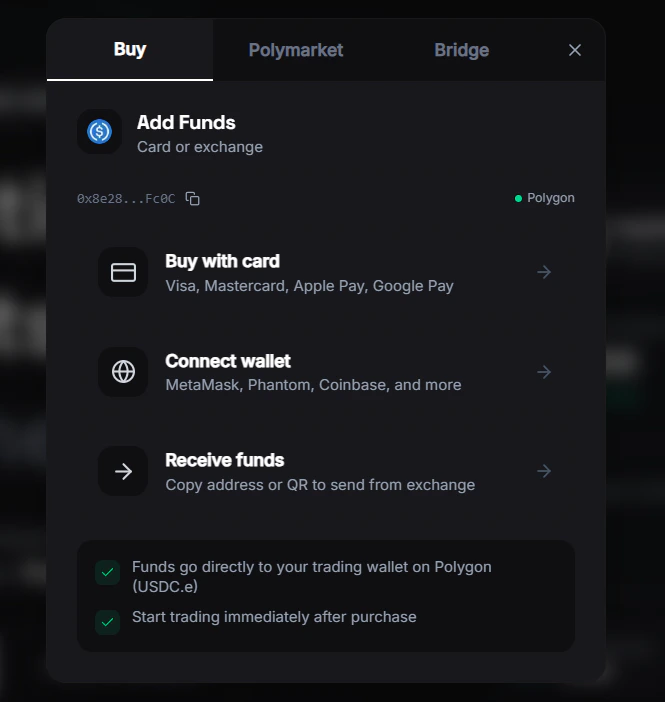
Depositing Funds
To start trading, you need in your FrenFlow wallet. FrenFlow supports deposits from 15+ blockchain networks.How to Deposit
1
Go to your wallet
Click on your balance in the header or navigate to the Wallet page.
2
Get your deposit address
Your unique deposit address is shown. You can also select which chain you’re sending from.
3
Send USDC
Send USDC from your external wallet or exchange to your FrenFlow deposit address.
4
Funds arrive
Deposits typically arrive within a few minutes depending on the chain. Your balance updates automatically.
Supported Chains
FrenFlow supports deposits from most major networks via Polymarket Bridge, including:- Ethereum, , Arbitrum, Optimism, Base
- Solana, Avalanche, BSC
- Bitcoin, Tron
- And more
Which Currency?
If you deposit USDC native (not ) on Polygon, you can swap it to USDC.e from the wallet page. Polymarket requires USDC.e for trading.
From Telegram
Use/wallet in the bot to see your deposit address and copy it directly. The bot also shows bridge options and your current balances.