
Documentation Index

Fetch the complete documentation index at: https://docs.frenflow.com/llms.txt

Use this file to discover all available pages before exploring further.

What is Wallet Tracker?

Wallet Tracker lets you monitor any Polymarket wallet address and see what they’re trading in real-time. Track whales, top traders, or anyone whose strategy interests you.

What You See

For each tracked wallet:
  • Live trades — Buys and sells as they happen
  • Open positions — What they currently hold
  • Trading volume — How active they are
  • Custom label — Name your tracked wallets for easy identification

Tracker vs. Follow vs. Copy

FeatureWallet TrackerSocial FollowCopy Trading
See their tradesYes (on-chain)Yes (in feed)Yes
Get alertsYes (buys/sells)NoYes
Auto-copyNoNoYes
Requires accountJust a wallet addressMust be FrenFlow userMust be FrenFlow user
Works for any walletYesNoNo
Wallet Tracker works with any Polymarket wallet address — the trader doesn’t need to be on FrenFlow.

From Telegram

Manage your wallet tracker from the bot:
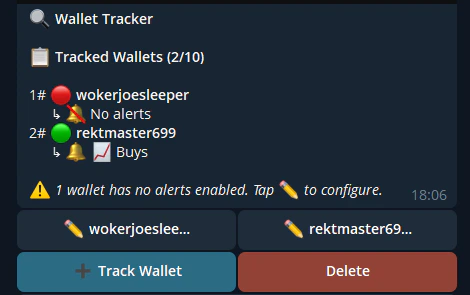
/track 0x1234...   — Start tracking a wallet
/tracking          — View all tracked wallets
/untrack 0x1234... — Stop tracking
Wallet Tracker
  You can rename tracked wallets, toggle alerts, and even copy-trade from a tracked wallet directly in Telegram.