
Your Wallet in Telegram
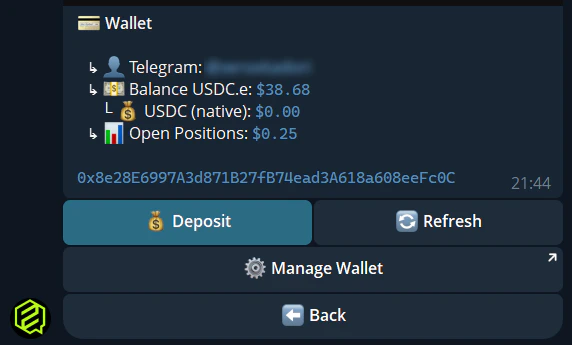
The/wallet command is your control center for everything money-related in the bot. Check balances, get your deposit address, swap tokens, and export your private key — all without leaving Telegram.
1. Check Your Balance
Type/wallet and the bot shows your current balances:
Tap Refresh to update your balance in real-time.
2. Deposit Funds
1
Open /wallet
Type
/wallet in the bot.2
Tap Deposit
The bot shows your unique Polygon deposit address.
3
Copy the address
Tap to copy, then paste it in your exchange or external wallet.
4
Send USDC
Send USDC from any supported chain. The Polymarket Bridge handles cross-chain deposits from 15+ networks.
5
Wait for confirmation
Deposits typically arrive in a few minutes. Use Refresh on 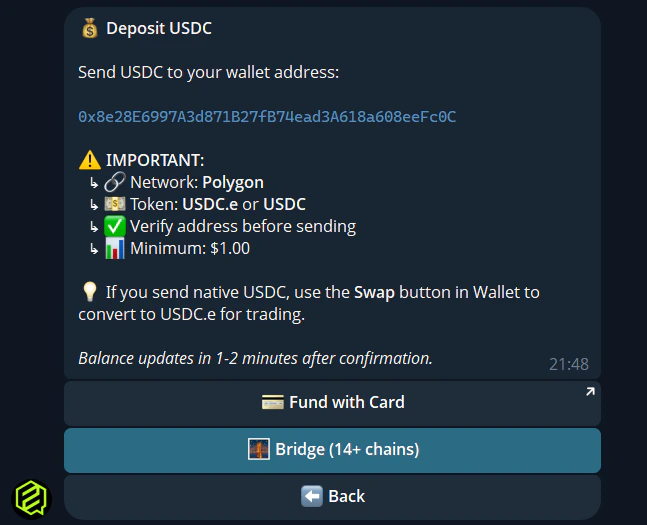
/wallet to check.3. Swap USDC → USDC.e
Polymarket requires USDC.e (bridged), not native USDC. If you see a USDC balance but can’t trade:- Open
/wallet - Tap Swap to USDC.e
- Choose Swap All or enter a custom amount
- Confirm — the swap executes via Uniswap
4. Bridge Options
The bot includes a Bridge button that shows instructions for bridging from other chains. You can also check bridge status if you’re waiting for funds.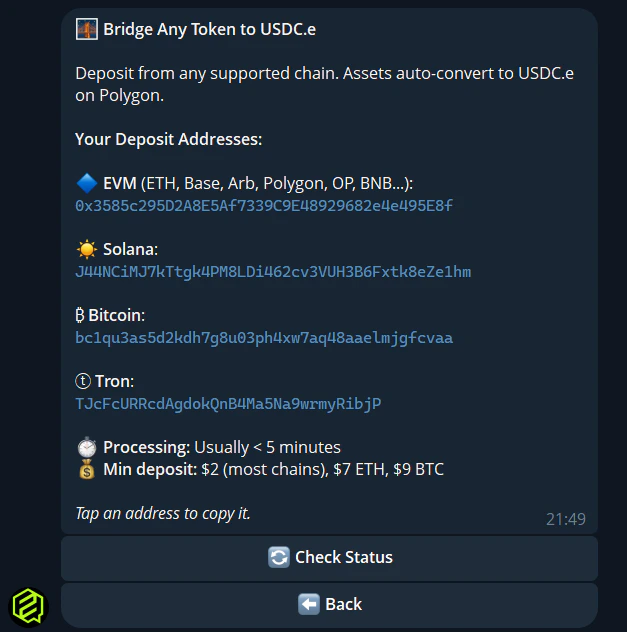
5. Export Private Key
Your FrenFlow wallet is yours. You can export the private key at any time:- Open
/wallet - Tap Manage Wallet — this opens the Privy Mini App
- From there, export your private key securely