
Buying Shares
1
Open a market
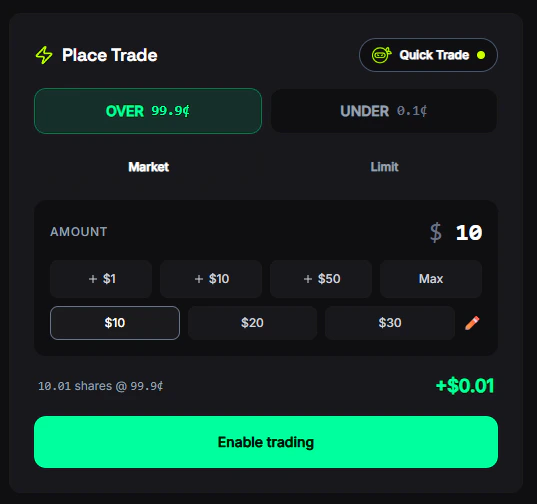
Click on any market card to open the market detail page. You’ll see the current prices, chart, orderbook, and recent trades.
2
Select an outcome
Choose Yes or No (or the specific outcomes for multi-outcome markets like “Up” / “Down”).
3
Enter your amount
Type the USD amount you want to spend. The number of shares you’ll receive is calculated automatically based on the current price.
4
Choose order type
Select Market for instant execution or Limit to set your own price. See Order Types for details.
5
Confirm
Review the fee estimate and potential return, then click Buy. Your order is signed securely and sent to the exchange.
Selling Shares
You can sell shares from an open position at any time before the market resolves.1
Go to your position
Find the market in your Portfolio → Positions or click directly on the market page.
2
Click Sell
Switch to the Sell tab in the trading modal.
3
Enter shares to sell
Enter the number of shares (or dollar amount) you want to sell. You can sell all or part of your position.
4
Confirm
Review the estimated return and click Sell. Market sells use Fill-and-Kill (partial fills allowed), so you may sell some shares even if full liquidity isn’t available.
Quick Trade (Ninja Mode)
For fast trading without the full modal:- Go to Settings → Trading and enable Ninja Mode
- Set your preferred quick-buy amounts (e.g., $5, $10, $25, $50, $100)
- On any market page, click a quick-buy button to instantly place a market order at that amount
Understanding Returns
When you buy shares, your potential return depends on the outcome: If you win (outcome happens):- If Yes wins: 100 × $1.00 = $100 → $35 profit (53.8% return)
- If No wins: shares worth $0 → $65 loss
Trade Confirmation
After every trade, you’ll see:- Shares acquired — how many shares you received
- Average price — the price per share you paid
- Fee charged — the platform fee deducted
- Share button — post your trade to the FrenFlow social feed
Trading from Telegram
You can buy and sell from the Telegram Bot with the same execution engine:- Search for a market (type any text or use
/search) - Tap the market → choose Buy Yes or Buy No
- Select a quick-buy amount or enter a custom amount
- Confirm — your trade executes instantly
/positions — tap any position and choose a sell percentage or custom amount.
Tips
Check the orderbook before large trades
Check the orderbook before large trades
For trades over $100, check the orderbook depth on the market page. Thin books can cause slippage on market orders.
Use limit orders for better prices
Use limit orders for better prices
If the spread is wide, place a limit order between the bid and ask. You’ll wait longer but often get a better entry.
Watch for markets ending soon
Watch for markets ending soon
Markets near expiry can have volatile prices. Good for quick profits, but also higher risk.