> ## Documentation Index
> Fetch the complete documentation index at: https://docs.frenflow.com/llms.txt
> Use this file to discover all available pages before exploring further.
# Deposit Funds
> Fund your FrenFlow wallet with USDC. Deposit from any blockchain via Polymarket Bridge, or transfer directly on Polygon.
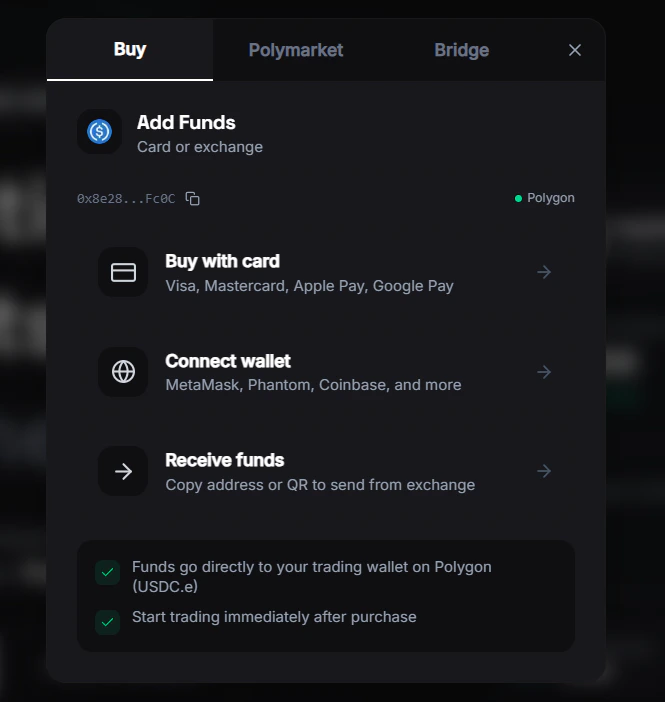 ## Depositing Funds
To start trading, you need USDC in your FrenFlow wallet. FrenFlow supports deposits from 15+ blockchain networks.
## How to Deposit
Click on your balance in the header or navigate to the Wallet page.
Your unique deposit address is shown. You can also select which chain you're sending from.
Send USDC from your external wallet or exchange to your FrenFlow deposit address.
Deposits typically arrive within a few minutes depending on the chain. Your balance updates automatically.
| Source | Destination | Used for |
| -------------------- | --------------------- | -------------------------- |
| Your external wallet | **USDC.e on Polygon** | Polymarket trading |
| Your external wallet | **USD on Solana** | Kalshi trading (via DFlow) |
## Supported Chains
FrenFlow supports deposits from most major networks via Polymarket Bridge, including:
* Ethereum, Polygon, Arbitrum, Optimism, Base
* Solana, Avalanche, BSC
* Bitcoin, Tron
* And more
## Which Currency?
| Platform | Currency | Chain |
| -------------- | --------------------- | ------- |
| **Polymarket** | USDC.e (bridged USDC) | Polygon |
| **Kalshi** | USD via Solana | Solana |
If you deposit USDC native (not USDC.e) on Polygon, you can swap it to USDC.e from the wallet page. Polymarket requires USDC.e for trading.
## From Telegram
Use `/wallet` in the bot to see your deposit address and copy it directly. The bot also shows bridge options and your current balances.
## Depositing Funds
To start trading, you need USDC in your FrenFlow wallet. FrenFlow supports deposits from 15+ blockchain networks.
## How to Deposit
Click on your balance in the header or navigate to the Wallet page.
Your unique deposit address is shown. You can also select which chain you're sending from.
Send USDC from your external wallet or exchange to your FrenFlow deposit address.
Deposits typically arrive within a few minutes depending on the chain. Your balance updates automatically.
| Source | Destination | Used for |
| -------------------- | --------------------- | -------------------------- |
| Your external wallet | **USDC.e on Polygon** | Polymarket trading |
| Your external wallet | **USD on Solana** | Kalshi trading (via DFlow) |
## Supported Chains
FrenFlow supports deposits from most major networks via Polymarket Bridge, including:
* Ethereum, Polygon, Arbitrum, Optimism, Base
* Solana, Avalanche, BSC
* Bitcoin, Tron
* And more
## Which Currency?
| Platform | Currency | Chain |
| -------------- | --------------------- | ------- |
| **Polymarket** | USDC.e (bridged USDC) | Polygon |
| **Kalshi** | USD via Solana | Solana |
If you deposit USDC native (not USDC.e) on Polygon, you can swap it to USDC.e from the wallet page. Polymarket requires USDC.e for trading.
## From Telegram
Use `/wallet` in the bot to see your deposit address and copy it directly. The bot also shows bridge options and your current balances.