> ## Documentation Index
> Fetch the complete documentation index at: https://docs.frenflow.com/llms.txt
> Use this file to discover all available pages before exploring further.
# Cross-Chain Bridging
> Bridge funds from 15+ blockchains to FrenFlow via Polymarket Bridge. Automatic conversion to USDC.e on Polygon.
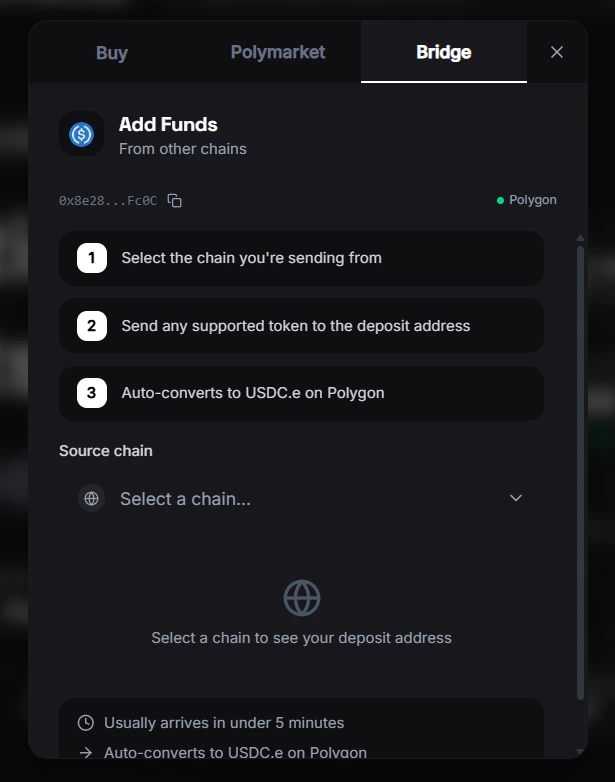 ## Bridging
FrenFlow uses the Polymarket Bridge to let you deposit from 15+ blockchain networks. The bridge automatically converts your funds to USDC.e on Polygon.
## USDC Swap
If you have USDC native (Circle) on Polygon instead of USDC.e (bridged), you can swap between them:
* **USDC → USDC.e** — Swap via Uniswap, needed for Polymarket trading
* Available from the wallet page
Polymarket only accepts USDC.e for trading. If your balance shows USDC native but not USDC.e, use the swap feature before placing trades.
## Polygon vs. Solana
| Platform | Chain | Currency |
| ------------------ | ------- | -------- |
| **Polymarket** | Polygon | USDC.e |
| **Kalshi (DFlow)** | Solana | USD |
Each platform uses its own chain. Your FrenFlow wallet manages both automatically based on where you're trading.
## From Telegram
The `/wallet` command in the bot includes a **Swap to USDC.e** button when you have native USDC. You can swap all or a custom amount directly from the chat.
## Bridging
FrenFlow uses the Polymarket Bridge to let you deposit from 15+ blockchain networks. The bridge automatically converts your funds to USDC.e on Polygon.
## USDC Swap
If you have USDC native (Circle) on Polygon instead of USDC.e (bridged), you can swap between them:
* **USDC → USDC.e** — Swap via Uniswap, needed for Polymarket trading
* Available from the wallet page
Polymarket only accepts USDC.e for trading. If your balance shows USDC native but not USDC.e, use the swap feature before placing trades.
## Polygon vs. Solana
| Platform | Chain | Currency |
| ------------------ | ------- | -------- |
| **Polymarket** | Polygon | USDC.e |
| **Kalshi (DFlow)** | Solana | USD |
Each platform uses its own chain. Your FrenFlow wallet manages both automatically based on where you're trading.
## From Telegram
The `/wallet` command in the bot includes a **Swap to USDC.e** button when you have native USDC. You can swap all or a custom amount directly from the chat.