> ## Documentation Index
> Fetch the complete documentation index at: https://docs.frenflow.com/llms.txt
> Use this file to discover all available pages before exploring further.
# Placing Trades on FrenFlow
> Step-by-step guide to buying and selling prediction market shares. Market orders, limit orders, and quick buy explained.
## Buying Shares
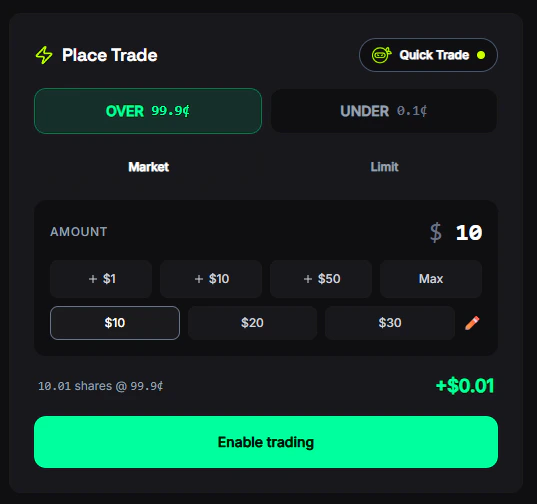
Click on any market card to open the market detail page. You'll see the current prices, chart, orderbook, and recent trades.
Choose **Yes** or **No** (or the specific outcomes for multi-outcome markets like "Up" / "Down").
Type the USD amount you want to spend. The number of shares you'll receive is calculated automatically based on the current price.
Select **Market** for instant execution or **Limit** to set your own price. See [Order Types](/trading/order-types) for details.
Review the fee estimate and potential return, then click **Buy**. Your order is signed securely and sent to the exchange.
## Selling Shares
You can sell shares from an open position at any time before the market resolves.
Find the market in your **[Portfolio → Positions](/portfolio/positions)** or click directly on the market page.
Switch to the **Sell** tab in the trading modal.
Enter the number of shares (or dollar amount) you want to sell. You can sell all or part of your position.
Review the estimated return and click **Sell**. Market sells use Fill-and-Kill (partial fills allowed), so you may sell some shares even if full liquidity isn't available.
## Quick Trade (Ninja Mode)
For fast trading without the full modal:
1. Go to **Settings → Trading** and enable **Ninja Mode**
2. Set your preferred quick-buy amounts (e.g., \$5, \$10, \$25, \$50, \$100)
3. On any market page, click a quick-buy button to instantly place a market order at that amount
Quick Trade executes immediately — no confirmation modal, no extra clicks. Best for experienced traders who want speed.
 ## Understanding Returns
When you buy shares, your potential return depends on the outcome:
**If you win (outcome happens):**
```
Profit = Shares × $1.00 − Amount Spent
```
**Example:** Buy 100 Yes shares at 65¢ for \$65
* If Yes wins: 100 × \$1.00 = \$100 → **\$35 profit** (53.8% return)
* If No wins: shares worth \$0 → **\$65 loss**
**If you sell early:**
```
Return = Shares × Current Price
Profit/Loss = (Current Price − Your Entry Price) × Shares
```
## Trade Confirmation
After every trade, you'll see:
* **Shares acquired** — how many shares you received
* **Average price** — the price per share you paid
* **Fee charged** — the [platform fee](/trading/fees) deducted
* **Share button** — post your trade to the FrenFlow social feed
## Trading from Telegram
You can buy and sell from the [Telegram Bot](/telegram-bot/setup) with the same execution engine:
1. Search for a market (type any text or use `/search`)
2. Tap the market → choose **Buy Yes** or **Buy No**
3. Select a quick-buy amount or enter a custom amount
4. Confirm — your trade executes instantly
Selling works from `/positions` — tap any position and choose a sell percentage or custom amount.
## Tips
For trades over \$100, check the orderbook depth on the market page. Thin books can cause slippage on market orders.
If the spread is wide, place a limit order between the bid and ask. You'll wait longer but often get a better entry.
Markets near expiry can have volatile prices. Good for quick profits, but also higher risk.
## Understanding Returns
When you buy shares, your potential return depends on the outcome:
**If you win (outcome happens):**
```
Profit = Shares × $1.00 − Amount Spent
```
**Example:** Buy 100 Yes shares at 65¢ for \$65
* If Yes wins: 100 × \$1.00 = \$100 → **\$35 profit** (53.8% return)
* If No wins: shares worth \$0 → **\$65 loss**
**If you sell early:**
```
Return = Shares × Current Price
Profit/Loss = (Current Price − Your Entry Price) × Shares
```
## Trade Confirmation
After every trade, you'll see:
* **Shares acquired** — how many shares you received
* **Average price** — the price per share you paid
* **Fee charged** — the [platform fee](/trading/fees) deducted
* **Share button** — post your trade to the FrenFlow social feed
## Trading from Telegram
You can buy and sell from the [Telegram Bot](/telegram-bot/setup) with the same execution engine:
1. Search for a market (type any text or use `/search`)
2. Tap the market → choose **Buy Yes** or **Buy No**
3. Select a quick-buy amount or enter a custom amount
4. Confirm — your trade executes instantly
Selling works from `/positions` — tap any position and choose a sell percentage or custom amount.
## Tips
For trades over \$100, check the orderbook depth on the market page. Thin books can cause slippage on market orders.
If the spread is wide, place a limit order between the bid and ask. You'll wait longer but often get a better entry.
Markets near expiry can have volatile prices. Good for quick profits, but also higher risk.