> ## Documentation Index
> Fetch the complete documentation index at: https://docs.frenflow.com/llms.txt
> Use this file to discover all available pages before exploring further.
# How Trading Works on FrenFlow
> Learn how prediction market trading works on FrenFlow. Buy and sell shares on Polymarket and Kalshi through a unified interface.
## Trading on FrenFlow
FrenFlow lets you trade on prediction markets from Polymarket and Kalshi through a single, unified interface. Buy and sell shares based on your predictions about real-world events — from elections to crypto prices.
 ## How It Works
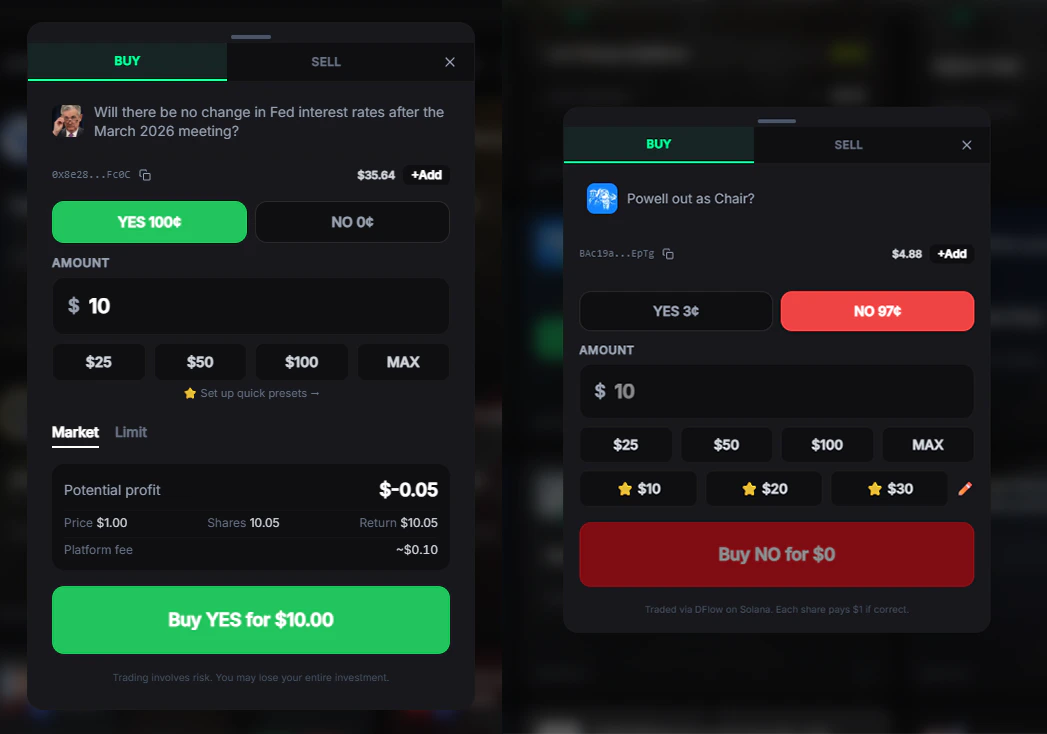
Prediction markets work like stocks, but instead of companies, you trade on **outcomes**. Each market has two sides:
| Side | Meaning | Example |
| ------- | --------------------------- | ------------------------------------ |
| **Yes** | You think this will happen | "BTC above \$100K?" → Buy Yes at 72¢ |
| **No** | You think this won't happen | "BTC above \$100K?" → Buy No at 28¢ |
Prices range from **1¢ to 99¢** and represent the market's implied probability. If you buy Yes at 72¢ and the outcome happens, you receive **\$1.00 per share** — a profit of 28¢ per share.
| Outcome | Result |
| ------------ | -------------------------------------------------- |
| **Yes wins** | You receive \$1.00 per share — profit of 28¢/share |
| **No wins** | Shares are worth \$0 — loss of 72¢/share |
## Getting Started
Go to **Settings → Trading** and click **Enable Trading**. This creates your on-chain credentials and approves your wallet for trading. One-time setup, takes about 10 seconds.
Deposit USDC to your FrenFlow wallet. Polymarket uses **USDC on Polygon**, Kalshi uses **USD via Solana**.
Browse trending markets, search by topic, or check what your frens are trading.
Select an outcome, enter your amount, and confirm. Your trade executes instantly for market orders.
## Two Trading Modes
The standard trading interface. See orderbook depth, set limit prices, choose expiration times, and review your trade before confirming.
Enable **Ninja Mode** in settings for one-click trading. Pre-set your favorite amounts (\$5, \$10, \$25, etc.) and trade instantly without the modal.
## Trade Limits
| Limit | Value |
| ----------------- | --------------------------------------- |
| **Minimum trade** | \$1 USD |
| **Maximum trade** | \$10,000 USD per order |
| **Min price** | 0.1¢ (market orders), 1¢ (limit orders) |
| **Max price** | 99¢ |
## Trading from Telegram
All trading features are also available from the [Telegram Bot](/telegram-bot/setup). Search markets, place trades, and manage positions — all without leaving Telegram.
* Type any text to search markets instantly
* Use `/search` to browse by category
* Use `/trending` to see popular markets
* Paste a **Polymarket URL** directly in the chat to get market details and trade buttons
```
/search — Browse markets by category
/trending — View trending markets
/bookmarks — Your saved markets
```
## Supported Platforms
Trade with USDC on Polygon. Thousands of markets across all categories. Orders execute on the Polymarket CLOB (Central Limit Order Book).
CFTC-regulated US exchange. Trade via DFlow on Solana. Requires one-time KYC verification.
## How It Works
Prediction markets work like stocks, but instead of companies, you trade on **outcomes**. Each market has two sides:
| Side | Meaning | Example |
| ------- | --------------------------- | ------------------------------------ |
| **Yes** | You think this will happen | "BTC above \$100K?" → Buy Yes at 72¢ |
| **No** | You think this won't happen | "BTC above \$100K?" → Buy No at 28¢ |
Prices range from **1¢ to 99¢** and represent the market's implied probability. If you buy Yes at 72¢ and the outcome happens, you receive **\$1.00 per share** — a profit of 28¢ per share.
| Outcome | Result |
| ------------ | -------------------------------------------------- |
| **Yes wins** | You receive \$1.00 per share — profit of 28¢/share |
| **No wins** | Shares are worth \$0 — loss of 72¢/share |
## Getting Started
Go to **Settings → Trading** and click **Enable Trading**. This creates your on-chain credentials and approves your wallet for trading. One-time setup, takes about 10 seconds.
Deposit USDC to your FrenFlow wallet. Polymarket uses **USDC on Polygon**, Kalshi uses **USD via Solana**.
Browse trending markets, search by topic, or check what your frens are trading.
Select an outcome, enter your amount, and confirm. Your trade executes instantly for market orders.
## Two Trading Modes
The standard trading interface. See orderbook depth, set limit prices, choose expiration times, and review your trade before confirming.
Enable **Ninja Mode** in settings for one-click trading. Pre-set your favorite amounts (\$5, \$10, \$25, etc.) and trade instantly without the modal.
## Trade Limits
| Limit | Value |
| ----------------- | --------------------------------------- |
| **Minimum trade** | \$1 USD |
| **Maximum trade** | \$10,000 USD per order |
| **Min price** | 0.1¢ (market orders), 1¢ (limit orders) |
| **Max price** | 99¢ |
## Trading from Telegram
All trading features are also available from the [Telegram Bot](/telegram-bot/setup). Search markets, place trades, and manage positions — all without leaving Telegram.
* Type any text to search markets instantly
* Use `/search` to browse by category
* Use `/trending` to see popular markets
* Paste a **Polymarket URL** directly in the chat to get market details and trade buttons
```
/search — Browse markets by category
/trending — View trending markets
/bookmarks — Your saved markets
```
## Supported Platforms
Trade with USDC on Polygon. Thousands of markets across all categories. Orders execute on the Polymarket CLOB (Central Limit Order Book).
CFTC-regulated US exchange. Trade via DFlow on Solana. Requires one-time KYC verification.