> ## Documentation Index
> Fetch the complete documentation index at: https://docs.frenflow.com/llms.txt
> Use this file to discover all available pages before exploring further.
# Telegram Bot Commands
> Complete list of FrenFlow Telegram Bot commands. Trading, wallet, copy trading, alerts, and social commands explained.
 ## Bot Commands
| Command | Description |
| --------------------- | ----------------------------------------------- |
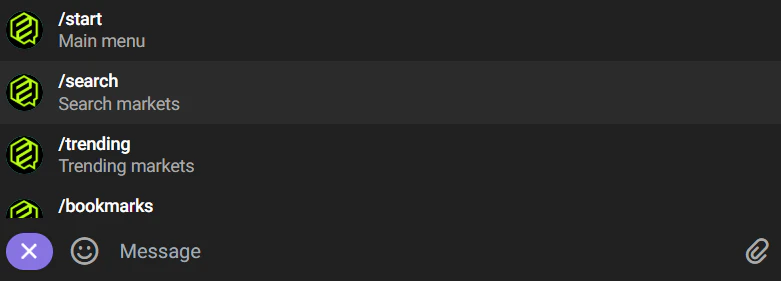
| `/start` | Main menu |
| `/wallet` | View balance and deposit address |
| `/positions` | View open positions and redeemable winnings |
| `/stats` | Trading statistics (volume, PnL, trades) |
| `/points` | Fren Points balance and Aura level |
| `/leaders` | Browse the trader leaderboard |
| `/follow @username` | Start copy trading a trader |
| `/unfollow @username` | Stop copy trading |
| `/traders` | View and manage your copied leaders |
| `/search` | Search for traders or markets |
| `/track 0x...` | Add a wallet to the tracker |
| `/tracking` | View tracked wallets |
| `/bookmarks` | Your saved markets |
| `/settings` | Risk settings (TP, SL, slippage, quick amounts) |
| `/notifications` | Notification preferences |
## Quick Search
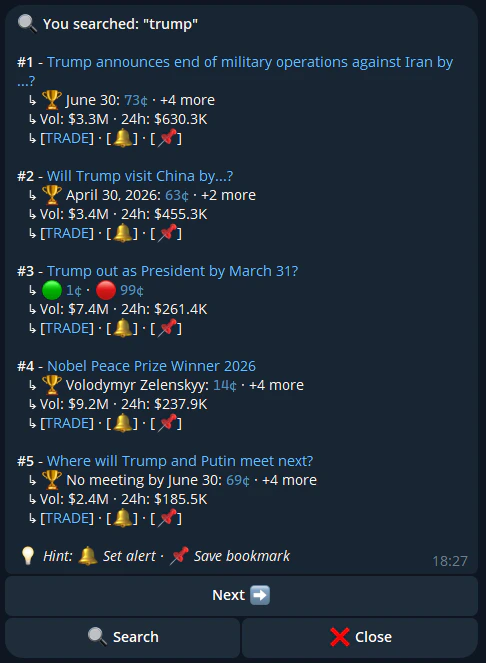
You don't need `/search` — just type any text directly and the bot will search for matching markets. For example, type "bitcoin" to find BTC-related markets.
## Bot Commands
| Command | Description |
| --------------------- | ----------------------------------------------- |
| `/start` | Main menu |
| `/wallet` | View balance and deposit address |
| `/positions` | View open positions and redeemable winnings |
| `/stats` | Trading statistics (volume, PnL, trades) |
| `/points` | Fren Points balance and Aura level |
| `/leaders` | Browse the trader leaderboard |
| `/follow @username` | Start copy trading a trader |
| `/unfollow @username` | Stop copy trading |
| `/traders` | View and manage your copied leaders |
| `/search` | Search for traders or markets |
| `/track 0x...` | Add a wallet to the tracker |
| `/tracking` | View tracked wallets |
| `/bookmarks` | Your saved markets |
| `/settings` | Risk settings (TP, SL, slippage, quick amounts) |
| `/notifications` | Notification preferences |
## Quick Search
You don't need `/search` — just type any text directly and the bot will search for matching markets. For example, type "bitcoin" to find BTC-related markets.
 ## Trading from Telegram
When you find a market:
1. Tap on the market to see details
2. Choose **Buy Yes** or **Buy No**
3. Enter your amount or use quick-buy buttons
4. Confirm the trade
## Trading from Telegram
When you find a market:
1. Tap on the market to see details
2. Choose **Buy Yes** or **Buy No**
3. Enter your amount or use quick-buy buttons
4. Confirm the trade
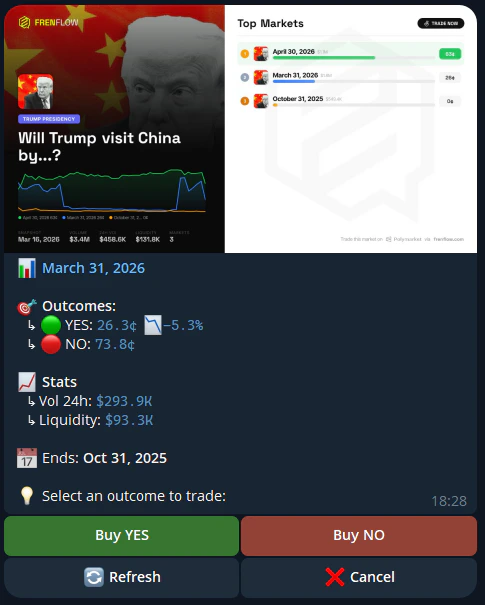
The same trading engine powers both web and Telegram — same speed, same execution.