> ## Documentation Index
> Fetch the complete documentation index at: https://docs.frenflow.com/llms.txt
> Use this file to discover all available pages before exploring further.
# Trader Profiles — Stats & History
> View detailed trader profiles with profit history, win rates, positions, and performance charts. Analyze traders before copying.
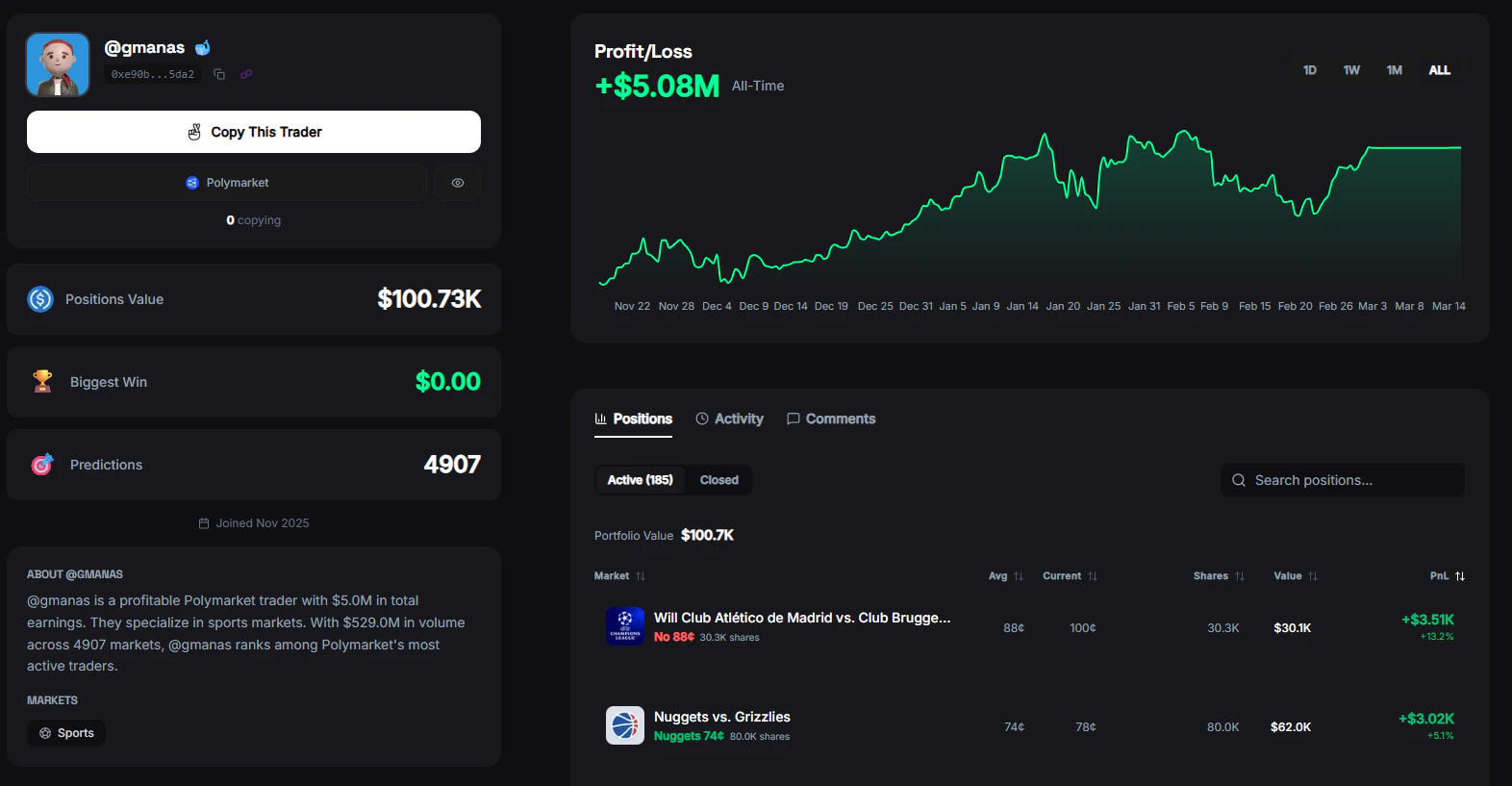 ## Trader Profile
Click on any trader from the leaderboard to see their full profile. Every profile includes detailed stats, open positions, trade history, and a PnL chart.
## Profile Overview
At the top of every trader profile:
* **Display name** — Polymarket username or FrenFlow username (if linked)
* **Avatar** — Profile picture (FrenFlow avatar takes priority if they're a user)
* **Badges** — FrenFlow user badge, tier badge (whale/shark/dolphin based on portfolio size)
* **Bio** — Short description (if set)
* **Category breakdown** — Which markets they trade most (Crypto, Politics, Sports, etc.)
## Trading Stats
| Stat | Description |
| ------------------ | ----------------------------------------- |
| **Total PnL** | Lifetime profit or loss |
| **Win Rate** | Percentage of trades that were profitable |
| **Wins / Losses** | Total count of winning and losing trades |
| **Volume** | Total USD trading volume |
| **Biggest Win** | Largest single profitable trade |
| **Markets Traded** | Number of different markets entered |
| **Position Value** | Current value of open positions |
## PnL Chart
A visual chart of the trader's profit and loss over time. See their consistency, drawdowns, and growth trajectory at a glance.
## Open Positions
See every market the trader currently has an active position in:
* Market name and current probability
* Position size (shares held)
* Entry price vs. current price
* Unrealized PnL
## Recent Trades
A chronological list of the trader's most recent trades:
* Market traded
* Direction (Buy/Sell) and outcome (Yes/No)
* Amount and price
* When the trade happened
## Actions
From any trader profile you can:
* **[Copy Trader](/copy-trading/follow-a-leader)** — Start automatically copying their trades
* **Add to Watchlist** — Track their activity without copying
* **Share** — Share the trader's profile with your frens
## From Telegram
Tap on any trader in the `/leaders` leaderboard to see their stats and start copying directly from the bot. You can configure copy mode, stake amount, and risk settings — all inline.
## Trader Profile
Click on any trader from the leaderboard to see their full profile. Every profile includes detailed stats, open positions, trade history, and a PnL chart.
## Profile Overview
At the top of every trader profile:
* **Display name** — Polymarket username or FrenFlow username (if linked)
* **Avatar** — Profile picture (FrenFlow avatar takes priority if they're a user)
* **Badges** — FrenFlow user badge, tier badge (whale/shark/dolphin based on portfolio size)
* **Bio** — Short description (if set)
* **Category breakdown** — Which markets they trade most (Crypto, Politics, Sports, etc.)
## Trading Stats
| Stat | Description |
| ------------------ | ----------------------------------------- |
| **Total PnL** | Lifetime profit or loss |
| **Win Rate** | Percentage of trades that were profitable |
| **Wins / Losses** | Total count of winning and losing trades |
| **Volume** | Total USD trading volume |
| **Biggest Win** | Largest single profitable trade |
| **Markets Traded** | Number of different markets entered |
| **Position Value** | Current value of open positions |
## PnL Chart
A visual chart of the trader's profit and loss over time. See their consistency, drawdowns, and growth trajectory at a glance.
## Open Positions
See every market the trader currently has an active position in:
* Market name and current probability
* Position size (shares held)
* Entry price vs. current price
* Unrealized PnL
## Recent Trades
A chronological list of the trader's most recent trades:
* Market traded
* Direction (Buy/Sell) and outcome (Yes/No)
* Amount and price
* When the trade happened
## Actions
From any trader profile you can:
* **[Copy Trader](/copy-trading/follow-a-leader)** — Start automatically copying their trades
* **Add to Watchlist** — Track their activity without copying
* **Share** — Share the trader's profile with your frens
## From Telegram
Tap on any trader in the `/leaders` leaderboard to see their stats and start copying directly from the bot. You can configure copy mode, stake amount, and risk settings — all inline.