> ## Documentation Index
> Fetch the complete documentation index at: https://docs.frenflow.com/llms.txt
> Use this file to discover all available pages before exploring further.
# Prediction Market Trader Leaderboard
> Discover the top prediction market traders ranked by profit, volume, and win rate. Find the best traders to follow and copy.
## Trader Leaderboard
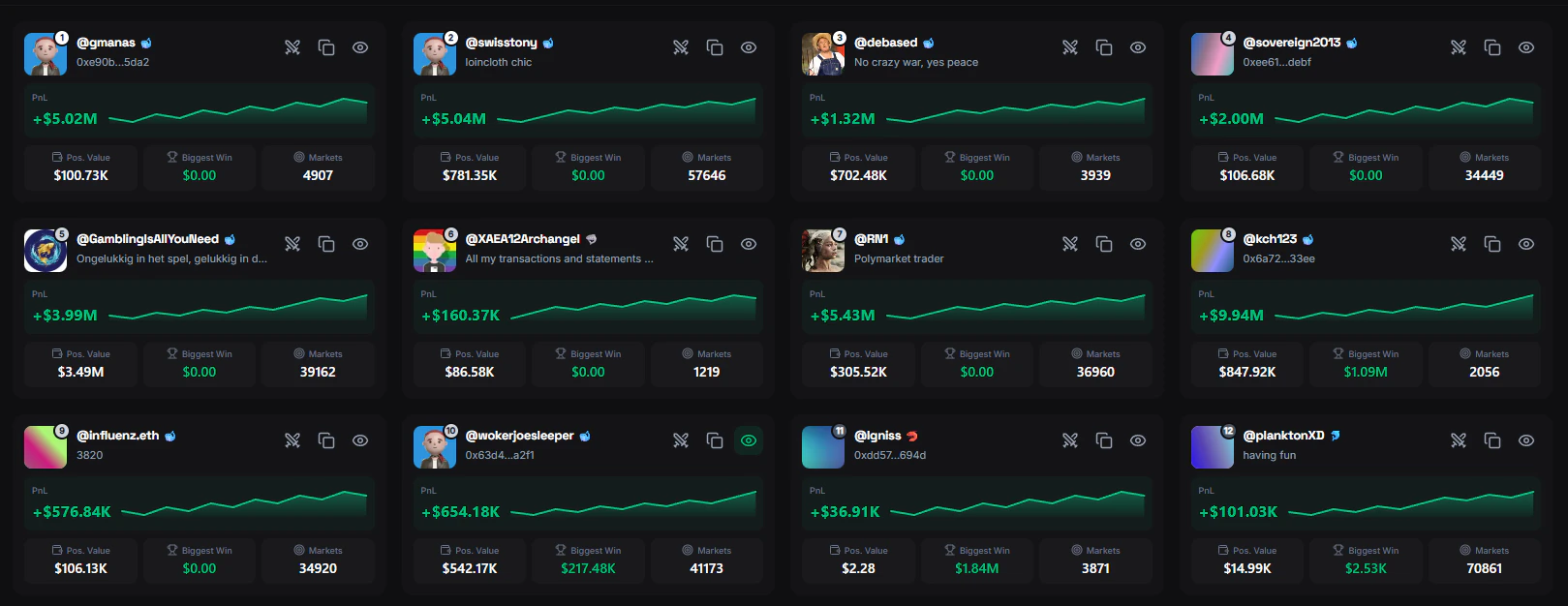
The Leaderboard ranks the top prediction market traders by performance. Discover who's making the best calls, track their moves, and copy their strategies.
 ## What You'll See
Every trader on the leaderboard shows:
| Stat | Description |
| ------------------ | ----------------------------------------------- |
| **Rank** | Position in the leaderboard |
| **PnL** | Total profit or loss in USD |
| **Win Rate** | Percentage of profitable trades |
| **Volume** | Total USD amount traded |
| **Biggest Win** | Largest single winning trade |
| **Position Value** | Current open positions balance |
| **Markets** | Number of different markets traded |
| **Copiers** | How many FrenFlow users are copying this trader |
## View Modes
Cards showing each trader with avatar, key stats, and a PnL sparkline chart. Best for browsing.
Table format with sortable columns. Best for comparing traders side by side.
## Sorting
Sort the leaderboard by what matters most to you. Use [Filters](/leaderboard/filters) to narrow down results.
**Polymarket:**
* **Rank** (default) — by trading volume rank
* **PnL** — most profitable first
* **Big Win** — largest single winning trade
* **Position Value** — biggest current portfolio
**Kalshi:**
* **Profit** — by PnL
* **Volume** — by trading volume
* **Predictions** — by number of markets traded
## Search
Find a specific trader using the search bar:
* Search by **username**, **wallet address**, or **X (Twitter) handle**
* Minimum 2 characters to start searching
* Results show rank and PnL alongside the name
* Your last 5 searches are saved for quick access
* Keyboard shortcut: **Cmd/Ctrl + K** to focus the search bar
## From Telegram
Access the leaderboard from the bot with `/leaders`. Browse top traders, view their stats, and start copying — all from Telegram.
```
/leaders — Browse the leaderboard
/follow @user — Start copying a trader
```
The Telegram leaderboard supports sorting by profit and volume, and pagination to browse through all ranked traders.
## From the Leaderboard You Can
* **[View profile](/leaderboard/profiles)** — Click any trader to see their full stats, positions, and trade history
* **[Copy trader](/copy-trading/follow-a-leader)** — Start copying their trades directly from the leaderboard
* **Add to watchlist** — Track a trader without copying them yet
* **Compare** — Select up to 2 traders for a side-by-side comparison
## What You'll See
Every trader on the leaderboard shows:
| Stat | Description |
| ------------------ | ----------------------------------------------- |
| **Rank** | Position in the leaderboard |
| **PnL** | Total profit or loss in USD |
| **Win Rate** | Percentage of profitable trades |
| **Volume** | Total USD amount traded |
| **Biggest Win** | Largest single winning trade |
| **Position Value** | Current open positions balance |
| **Markets** | Number of different markets traded |
| **Copiers** | How many FrenFlow users are copying this trader |
## View Modes
Cards showing each trader with avatar, key stats, and a PnL sparkline chart. Best for browsing.
Table format with sortable columns. Best for comparing traders side by side.
## Sorting
Sort the leaderboard by what matters most to you. Use [Filters](/leaderboard/filters) to narrow down results.
**Polymarket:**
* **Rank** (default) — by trading volume rank
* **PnL** — most profitable first
* **Big Win** — largest single winning trade
* **Position Value** — biggest current portfolio
**Kalshi:**
* **Profit** — by PnL
* **Volume** — by trading volume
* **Predictions** — by number of markets traded
## Search
Find a specific trader using the search bar:
* Search by **username**, **wallet address**, or **X (Twitter) handle**
* Minimum 2 characters to start searching
* Results show rank and PnL alongside the name
* Your last 5 searches are saved for quick access
* Keyboard shortcut: **Cmd/Ctrl + K** to focus the search bar
## From Telegram
Access the leaderboard from the bot with `/leaders`. Browse top traders, view their stats, and start copying — all from Telegram.
```
/leaders — Browse the leaderboard
/follow @user — Start copying a trader
```
The Telegram leaderboard supports sorting by profit and volume, and pagination to browse through all ranked traders.
## From the Leaderboard You Can
* **[View profile](/leaderboard/profiles)** — Click any trader to see their full stats, positions, and trade history
* **[Copy trader](/copy-trading/follow-a-leader)** — Start copying their trades directly from the leaderboard
* **Add to watchlist** — Track a trader without copying them yet
* **Compare** — Select up to 2 traders for a side-by-side comparison