> ## Documentation Index
> Fetch the complete documentation index at: https://docs.frenflow.com/llms.txt
> Use this file to discover all available pages before exploring further.
# Set Up Wallet Tracker
> Step-by-step guide to tracking Polymarket whale wallets on FrenFlow. Add wallets, configure alerts, and monitor trades in real-time.
 ## What You'll Do
Track any Polymarket wallet address to see their trades in real-time and get notified when they buy or sell. Perfect for watching whales, top traders, or any wallet whose strategy interests you.
## 1. Find a Wallet to Track
You can get wallet addresses from:
| Source | How |
| --------------- | ----------------------------------------------------------- |
| **Leaderboard** | Click on a trader's profile → their wallet address is shown |
| **Polymarket** | Copy a trader's wallet from their Polymarket profile URL |
| **X (Twitter)** | Traders sometimes share their wallet addresses |
| **On-chain** | Find active wallets on Polygonscan |
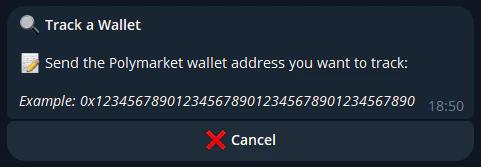
## 2. Add the Wallet (Telegram)
Add a wallet from the bot:
```
/track 0x1234567890abcdef1234567890abcdef12345678
```
The bot confirms the wallet is valid and starts tracking immediately. Use `/tracking` to see all your tracked wallets.
## What You'll Do
Track any Polymarket wallet address to see their trades in real-time and get notified when they buy or sell. Perfect for watching whales, top traders, or any wallet whose strategy interests you.
## 1. Find a Wallet to Track
You can get wallet addresses from:
| Source | How |
| --------------- | ----------------------------------------------------------- |
| **Leaderboard** | Click on a trader's profile → their wallet address is shown |
| **Polymarket** | Copy a trader's wallet from their Polymarket profile URL |
| **X (Twitter)** | Traders sometimes share their wallet addresses |
| **On-chain** | Find active wallets on Polygonscan |
## 2. Add the Wallet (Telegram)
Add a wallet from the bot:
```
/track 0x1234567890abcdef1234567890abcdef12345678
```
The bot confirms the wallet is valid and starts tracking immediately. Use `/tracking` to see all your tracked wallets.
 ## 3. Get Alerts
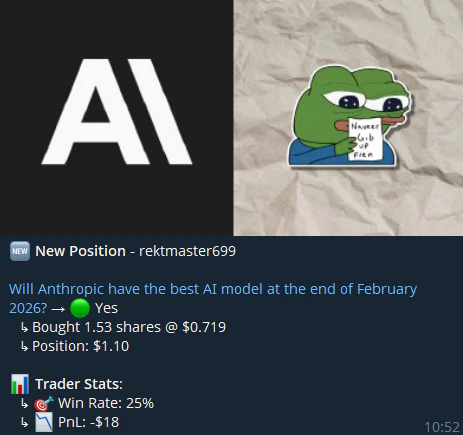
When the tracked wallet trades, you'll receive:
* **Telegram DM** — Instant notification from the FrenFlow bot with trade details, market link, and quick-trade buttons
Each alert shows the market, direction (buy/sell), amount, and price.
## 3. Get Alerts
When the tracked wallet trades, you'll receive:
* **Telegram DM** — Instant notification from the FrenFlow bot with trade details, market link, and quick-trade buttons
Each alert shows the market, direction (buy/sell), amount, and price.
 ## 4. Act on Alerts
When you see an interesting trade from a tracked wallet:
* **Quick trade** — Click through the alert to open the same market and trade
* **Copy-trade** — If you want to auto-copy this wallet, consider setting up [Copy Trading](/copy-trading/how-it-works) on that trader
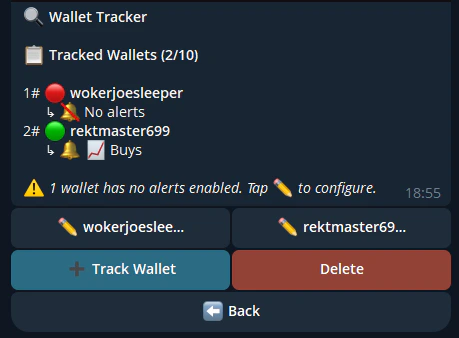
## Managing Your Trackers
| Action | Web | Telegram |
| ----------------- | ------------------- | --------------------- |
| **View all** | Wallet Tracker page | `/tracking` |
| **Rename** | Edit label button | Tap wallet → rename |
| **Toggle alerts** | Toggle switches | Tap wallet → settings |
| **Remove** | Remove button | `/untrack 0x...` |
## 4. Act on Alerts
When you see an interesting trade from a tracked wallet:
* **Quick trade** — Click through the alert to open the same market and trade
* **Copy-trade** — If you want to auto-copy this wallet, consider setting up [Copy Trading](/copy-trading/how-it-works) on that trader
## Managing Your Trackers
| Action | Web | Telegram |
| ----------------- | ------------------- | --------------------- |
| **View all** | Wallet Tracker page | `/tracking` |
| **Rename** | Edit label button | Tap wallet → rename |
| **Toggle alerts** | Toggle switches | Tap wallet → settings |
| **Remove** | Remove button | `/untrack 0x...` |
 ## Tips
Watch a wallet's trades for a few days before committing to copy trading. This lets you evaluate their strategy risk-free.
After a few tracked wallets, addresses all look the same. Good labels save you time.
Tracking 50 wallets means constant notifications. Start with 3-5 high-quality wallets and add more as needed.
## Tips
Watch a wallet's trades for a few days before committing to copy trading. This lets you evaluate their strategy risk-free.
After a few tracked wallets, addresses all look the same. Good labels save you time.
Tracking 50 wallets means constant notifications. Start with 3-5 high-quality wallets and add more as needed.