> ## Documentation Index
> Fetch the complete documentation index at: https://docs.frenflow.com/llms.txt
> Use this file to discover all available pages before exploring further.
# Trading from Telegram
> Complete guide to trading prediction markets via the FrenFlow Telegram Bot. Search markets, place trades, and manage positions.
 ## Why Telegram?
The FrenFlow Telegram Bot gives you the full trading experience without opening a browser. Same wallet, same portfolio, same execution engine — just faster for mobile trading.
## 1. Set Up the Bot
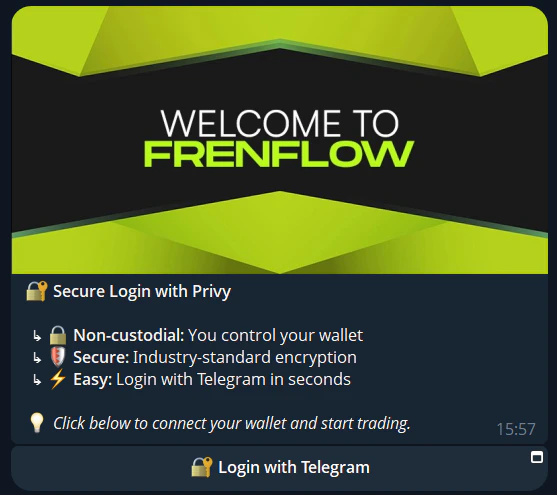
Go to [@FrenFlowBot](https://t.me/FrenFlowBot) on Telegram and tap **Start**.
**New to FrenFlow?** Sign up directly in Telegram — email or wallet.
**Already have an account?** Go to **Settings → Link Telegram** on the website to connect. Your wallet, positions, and settings sync automatically.
Use `/enabletrading` to set up your trading credentials. This opens a Privy Mini App — same secure process as the website.
Use `/wallet` to see your deposit address. Send USDC from any exchange or wallet.
## Why Telegram?
The FrenFlow Telegram Bot gives you the full trading experience without opening a browser. Same wallet, same portfolio, same execution engine — just faster for mobile trading.
## 1. Set Up the Bot
Go to [@FrenFlowBot](https://t.me/FrenFlowBot) on Telegram and tap **Start**.
**New to FrenFlow?** Sign up directly in Telegram — email or wallet.
**Already have an account?** Go to **Settings → Link Telegram** on the website to connect. Your wallet, positions, and settings sync automatically.
Use `/enabletrading` to set up your trading credentials. This opens a Privy Mini App — same secure process as the website.
Use `/wallet` to see your deposit address. Send USDC from any exchange or wallet.
 ## 2. Find Markets
Three ways to discover markets:
### Quick Search
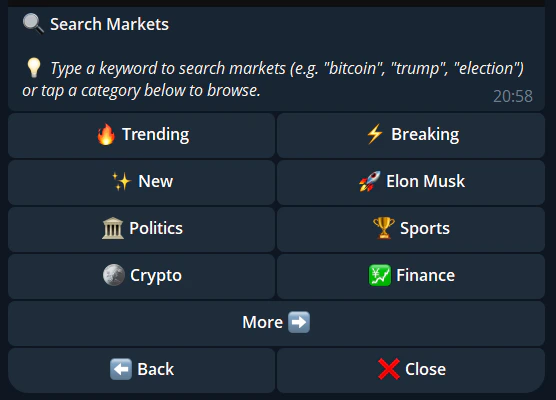
Just **type any text** directly in the chat. The bot searches for matching markets instantly. No command needed.
```
bitcoin → BTC-related markets
trump → Political markets
champions league → Sports markets
```
### Browse by Category
Use `/search` to see all 15+ categories. Tap a category to browse subcategories and individual markets.
## 2. Find Markets
Three ways to discover markets:
### Quick Search
Just **type any text** directly in the chat. The bot searches for matching markets instantly. No command needed.
```
bitcoin → BTC-related markets
trump → Political markets
champions league → Sports markets
```
### Browse by Category
Use `/search` to see all 15+ categories. Tap a category to browse subcategories and individual markets.
 ### Trending
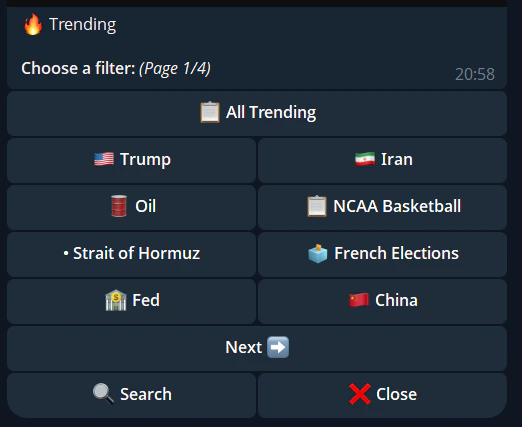
Use `/trending` to see the most popular markets right now.
### Trending
Use `/trending` to see the most popular markets right now.
 ### Paste a Link
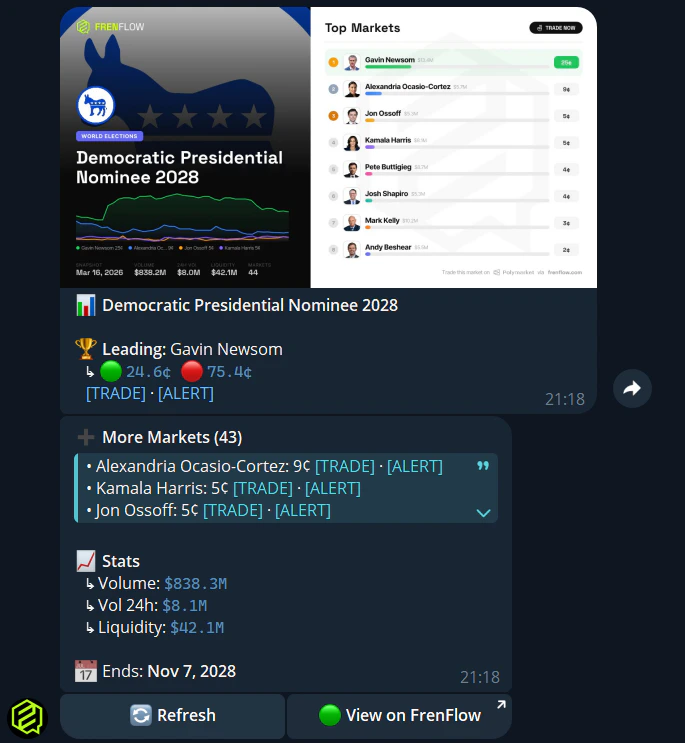
Paste any **Polymarket URL** in the chat — the bot detects it, shows the market details, and gives you trade buttons.
### Paste a Link
Paste any **Polymarket URL** in the chat — the bot detects it, shows the market details, and gives you trade buttons.
 ## 3. Place a Trade
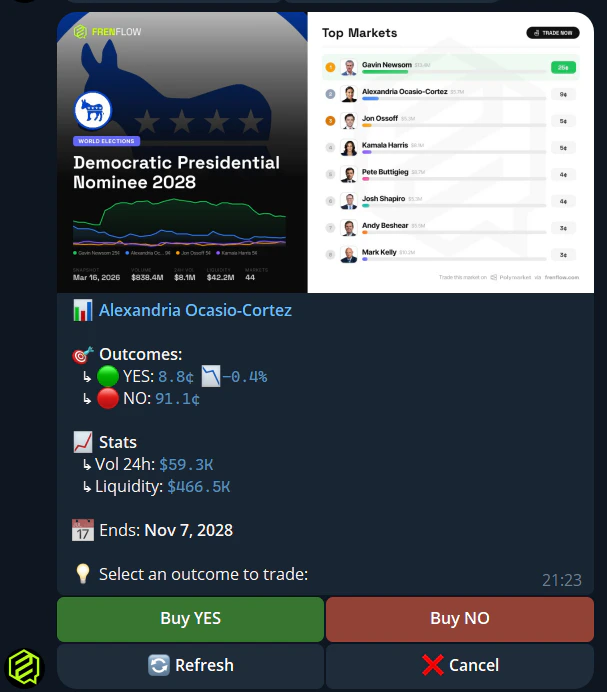
From search results or trending, tap the market you want.
Tap **Buy Yes** or **Buy No** based on your prediction.
Choose a quick-buy amount (\$5, \$10, \$25...) or enter a custom amount. Quick-buy amounts are configurable in `/settings`.
Review the trade details and tap **Confirm**. Your trade executes in seconds.
## 3. Place a Trade
From search results or trending, tap the market you want.
Tap **Buy Yes** or **Buy No** based on your prediction.
Choose a quick-buy amount (\$5, \$10, \$25...) or enter a custom amount. Quick-buy amounts are configurable in `/settings`.
Review the trade details and tap **Confirm**. Your trade executes in seconds.
 ## 4. Manage Positions
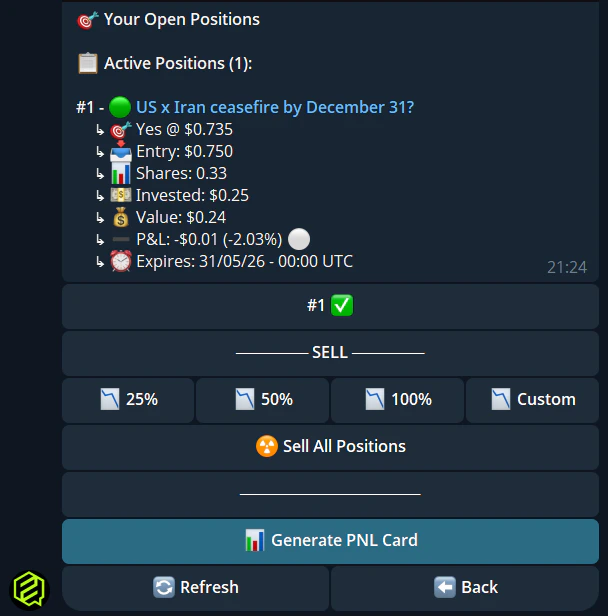
Use `/positions` to see all your open positions. For each position you can:
* **Sell** — Partial (25%, 50%, 75%) or full exit
* **View market** — See current prices and details
* **Redeem** — Claim winnings from resolved markets
## 4. Manage Positions
Use `/positions` to see all your open positions. For each position you can:
* **Sell** — Partial (25%, 50%, 75%) or full exit
* **View market** — See current prices and details
* **Redeem** — Claim winnings from resolved markets
Other useful commands:
```
/stats — Your trading statistics (volume, PnL, trades)
/bookmarks — Markets you've saved
/alerts — Your active price alerts
```
## 5. Set Up Notifications
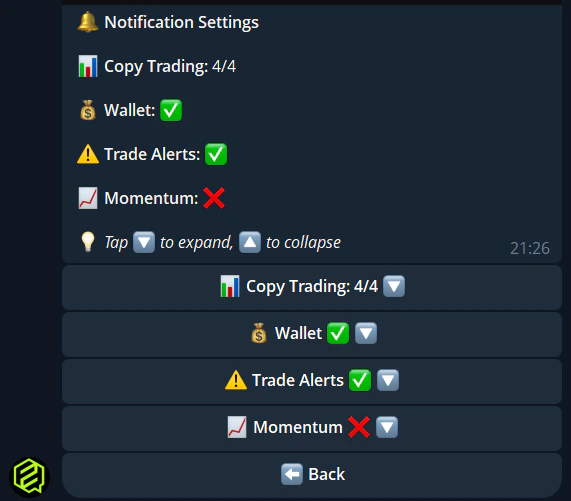
Use `/notifications` to configure what the bot notifies you about:
* Copy trade executions
* Limit order fills and expirations
* Position resolutions
* Wallet tracker alerts
* Price alert triggers
* Low balance warnings
 ## 6. Customize Trading Settings
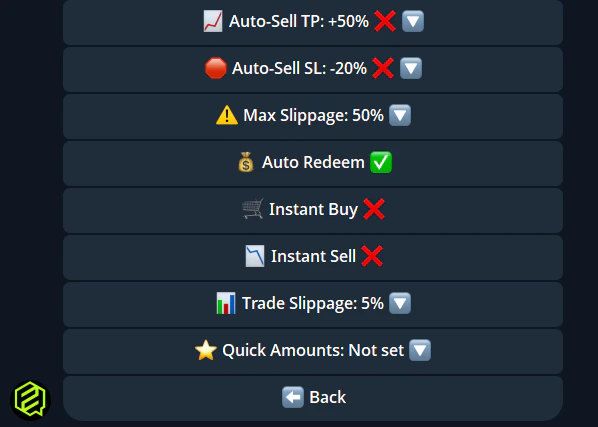
Use `/settings` to configure:
| Setting | Description |
| --------------------- | -------------------------------------- |
| **Max slippage** | Price deviation tolerance |
| **Quick-buy amounts** | Preset dollar amounts for fast trading |
| **Instant buy/sell** | Skip confirmation for faster execution |
## 6. Customize Trading Settings
Use `/settings` to configure:
| Setting | Description |
| --------------------- | -------------------------------------- |
| **Max slippage** | Price deviation tolerance |
| **Quick-buy amounts** | Preset dollar amounts for fast trading |
| **Instant buy/sell** | Skip confirmation for faster execution |
 ## Essential Commands
| Command | What it does |
| ---------------- | -------------------------- |
| `/start` | Main menu with all options |
| `/wallet` | Balance, deposit, swap |
| `/positions` | Your open positions |
| `/stats` | Trading statistics |
| `/search` | Browse markets by category |
| `/trending` | Popular markets |
| `/leaders` | Leaderboard + copy trading |
| `/alerts` | Price alerts |
| `/track 0x...` | Track a wallet |
| `/points` | Fren Points + level |
| `/settings` | Trading settings |
| `/notifications` | Alert preferences |
| `/help` | Full command list |
## Tips
Don't bother with /search for specific topics. Just type "bitcoin" or "election" directly and the bot finds matching markets instantly.
Configure your favorite amounts in /settings so you can trade in two taps instead of typing a number every time.
In /settings, toggle **Instant Buy** to skip the confirmation step. Faster trading, but be careful — no take-backs.
Pin the FrenFlow bot in your Telegram chat list so it's always one tap away.
## Essential Commands
| Command | What it does |
| ---------------- | -------------------------- |
| `/start` | Main menu with all options |
| `/wallet` | Balance, deposit, swap |
| `/positions` | Your open positions |
| `/stats` | Trading statistics |
| `/search` | Browse markets by category |
| `/trending` | Popular markets |
| `/leaders` | Leaderboard + copy trading |
| `/alerts` | Price alerts |
| `/track 0x...` | Track a wallet |
| `/points` | Fren Points + level |
| `/settings` | Trading settings |
| `/notifications` | Alert preferences |
| `/help` | Full command list |
## Tips
Don't bother with /search for specific topics. Just type "bitcoin" or "election" directly and the bot finds matching markets instantly.
Configure your favorite amounts in /settings so you can trade in two taps instead of typing a number every time.
In /settings, toggle **Instant Buy** to skip the confirmation step. Faster trading, but be careful — no take-backs.
Pin the FrenFlow bot in your Telegram chat list so it's always one tap away.