> ## Documentation Index
> Fetch the complete documentation index at: https://docs.frenflow.com/llms.txt
> Use this file to discover all available pages before exploring further.
# Manage Wallet from Telegram
> Manage your FrenFlow wallet from Telegram. Check balances, deposit USDC, swap tokens, and export your private key — all from the bot.
 ## Your Wallet in Telegram
The `/wallet` command is your control center for everything money-related in the bot. Check balances, get your deposit address, swap tokens, and export your private key — all without leaving Telegram.
## Your Wallet in Telegram
The `/wallet` command is your control center for everything money-related in the bot. Check balances, get your deposit address, swap tokens, and export your private key — all without leaving Telegram.
 ## 1. Check Your Balance
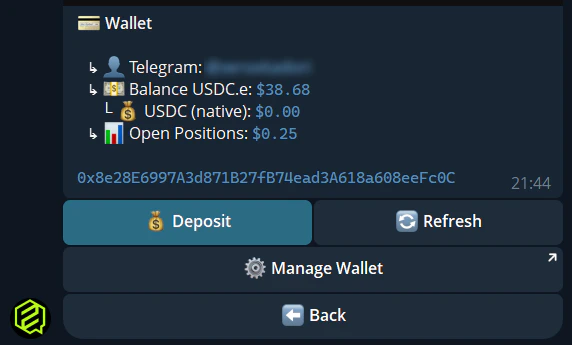
Type `/wallet` and the bot shows your current balances:
| Token | Description |
| ---------- | ----------------------------------------------------- |
| **USDC.e** | Bridged USDC on Polygon — used for Polymarket trading |
| **USDC** | Native USDC (Circle) on Polygon |
| **POL** | Polygon gas token (auto-funded for trading) |
Tap **Refresh** to update your balance in real-time.
## 2. Deposit Funds
Type `/wallet` in the bot.
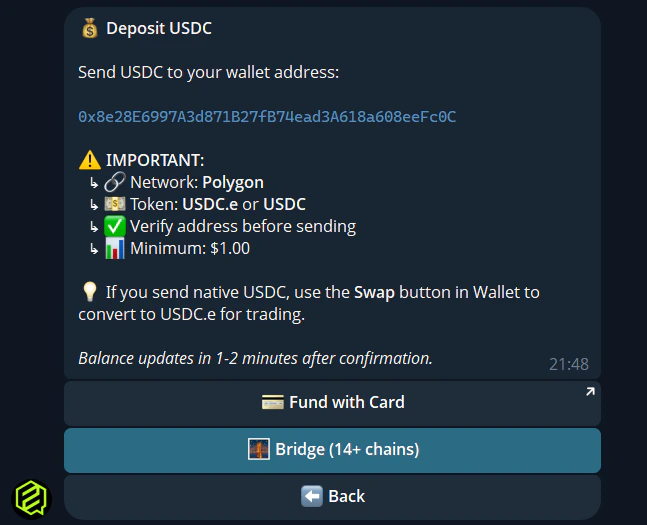
The bot shows your unique Polygon deposit address.
Tap to copy, then paste it in your exchange or external wallet.
Send USDC from any supported chain. The Polymarket Bridge handles cross-chain deposits from 15+ networks.
Deposits typically arrive in a few minutes. Use **Refresh** on `/wallet` to check.
## 1. Check Your Balance
Type `/wallet` and the bot shows your current balances:
| Token | Description |
| ---------- | ----------------------------------------------------- |
| **USDC.e** | Bridged USDC on Polygon — used for Polymarket trading |
| **USDC** | Native USDC (Circle) on Polygon |
| **POL** | Polygon gas token (auto-funded for trading) |
Tap **Refresh** to update your balance in real-time.
## 2. Deposit Funds
Type `/wallet` in the bot.
The bot shows your unique Polygon deposit address.
Tap to copy, then paste it in your exchange or external wallet.
Send USDC from any supported chain. The Polymarket Bridge handles cross-chain deposits from 15+ networks.
Deposits typically arrive in a few minutes. Use **Refresh** on `/wallet` to check.
 Always double-check the address before sending. Send a small test amount first if it's your first time.
## 3. Swap USDC → USDC.e
Polymarket requires **USDC.e** (bridged), not native USDC. If you see a USDC balance but can't trade:
1. Open `/wallet`
2. Tap **Swap to USDC.e**
3. Choose **Swap All** or enter a custom amount
4. Confirm — the swap executes via Uniswap
After the swap, your USDC.e balance is ready for trading.
## 4. Bridge Options
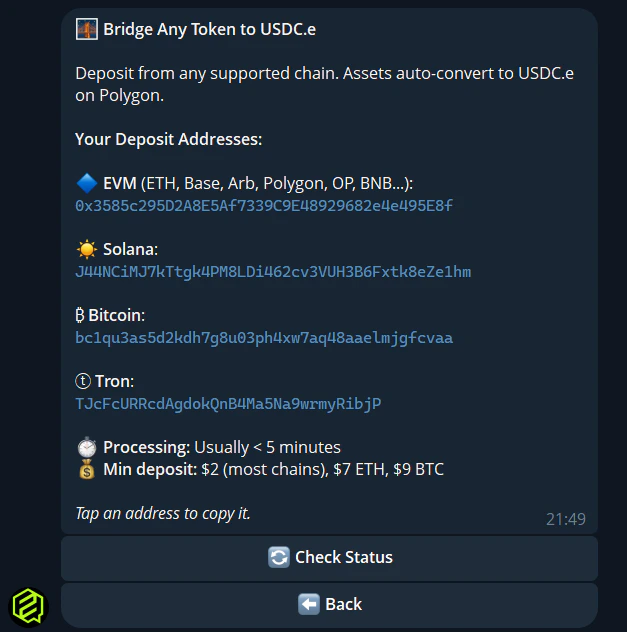
The bot includes a **Bridge** button that shows instructions for bridging from other chains. You can also check bridge status if you're waiting for funds.
Always double-check the address before sending. Send a small test amount first if it's your first time.
## 3. Swap USDC → USDC.e
Polymarket requires **USDC.e** (bridged), not native USDC. If you see a USDC balance but can't trade:
1. Open `/wallet`
2. Tap **Swap to USDC.e**
3. Choose **Swap All** or enter a custom amount
4. Confirm — the swap executes via Uniswap
After the swap, your USDC.e balance is ready for trading.
## 4. Bridge Options
The bot includes a **Bridge** button that shows instructions for bridging from other chains. You can also check bridge status if you're waiting for funds.
 ## 5. Export Private Key
Your FrenFlow wallet is yours. You can export the private key at any time:
1. Open `/wallet`
2. Tap **Manage Wallet** — this opens the Privy Mini App
3. From there, export your private key securely
Use this key to import your wallet into MetaMask, Rabby, Phantom, or any wallet app.
**Never share your private key with anyone.** Anyone with your key has full control of your wallet and funds. Delete the message after copying the key.
## Quick Reference
| Action | How |
| ------------------- | --------------------------- |
| **Check balance** | `/wallet` |
| **Deposit address** | `/wallet` → Deposit |
| **Swap USDC** | `/wallet` → Swap to USDC.e |
| **Bridge status** | `/wallet` → Bridge → Status |
| **Export key** | `/wallet` → Export Key |
| **Refresh** | `/wallet` → Refresh button |
## 5. Export Private Key
Your FrenFlow wallet is yours. You can export the private key at any time:
1. Open `/wallet`
2. Tap **Manage Wallet** — this opens the Privy Mini App
3. From there, export your private key securely
Use this key to import your wallet into MetaMask, Rabby, Phantom, or any wallet app.
**Never share your private key with anyone.** Anyone with your key has full control of your wallet and funds. Delete the message after copying the key.
## Quick Reference
| Action | How |
| ------------------- | --------------------------- |
| **Check balance** | `/wallet` |
| **Deposit address** | `/wallet` → Deposit |
| **Swap USDC** | `/wallet` → Swap to USDC.e |
| **Bridge status** | `/wallet` → Bridge → Status |
| **Export key** | `/wallet` → Export Key |
| **Refresh** | `/wallet` → Refresh button |