> ## Documentation Index
> Fetch the complete documentation index at: https://docs.frenflow.com/llms.txt
> Use this file to discover all available pages before exploring further.
# Share Your PnL
> Generate shareable PnL cards for your prediction market trades. Post your profits on social media and show off your trading skills.
 ## Why Share?
Sharing your trades and performance is how you build your reputation on FrenFlow. PnL cards look great on X (Twitter), Telegram, and the FrenFlow social feed — and you earn [Fren Points](/fren-points/how-to-earn) for posting.
## PnL Cards
PnL cards are auto-generated images that showcase your performance. There are two types:
## Why Share?
Sharing your trades and performance is how you build your reputation on FrenFlow. PnL cards look great on X (Twitter), Telegram, and the FrenFlow social feed — and you earn [Fren Points](/fren-points/how-to-earn) for posting.
## PnL Cards
PnL cards are auto-generated images that showcase your performance. There are two types:
 ### Position Card
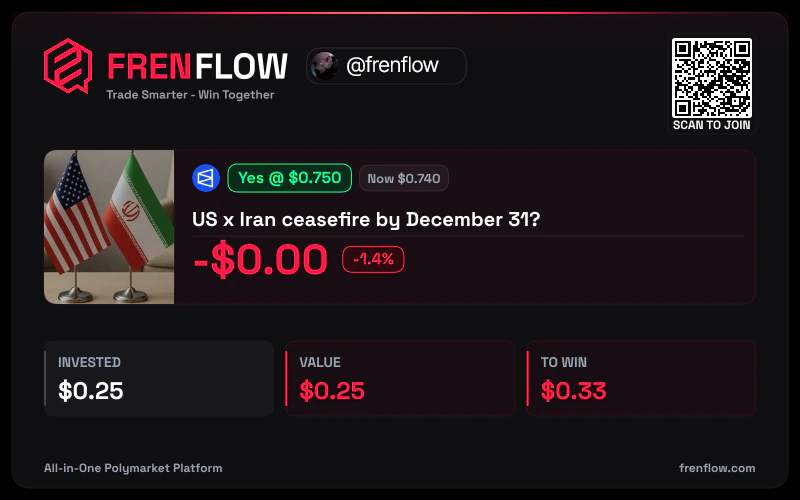
Shows a specific trade:
* Market name and outcome
* Entry price vs. current price
* Profit/loss amount and percentage
* FrenFlow branding
**How to generate:**
1. Go to **Portfolio → Positions**
2. Click **Share** on any position
3. The PnL card image is generated instantly
4. Download or share directly to X, Telegram, or the FrenFlow feed
### Stats Card
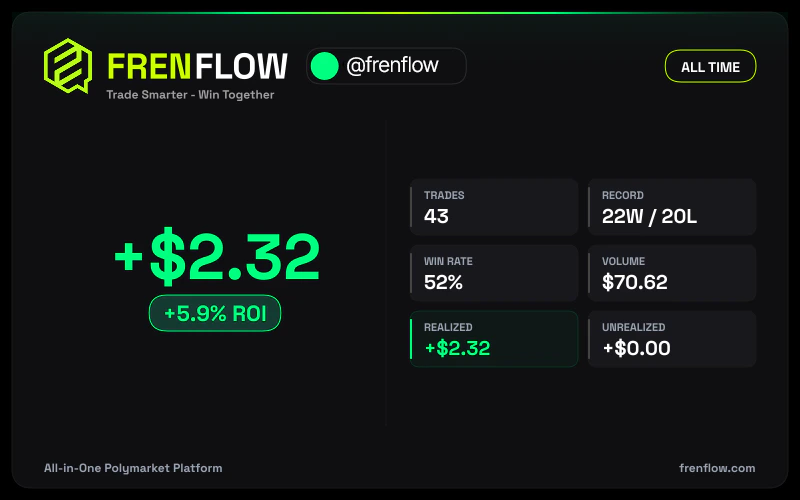
Shows your overall performance:
* Total PnL
* Win rate
* Trading volume
* Number of trades
### Position Card
Shows a specific trade:
* Market name and outcome
* Entry price vs. current price
* Profit/loss amount and percentage
* FrenFlow branding
**How to generate:**
1. Go to **Portfolio → Positions**
2. Click **Share** on any position
3. The PnL card image is generated instantly
4. Download or share directly to X, Telegram, or the FrenFlow feed
### Stats Card
Shows your overall performance:
* Total PnL
* Win rate
* Trading volume
* Number of trades
 **How to generate:**
1. Go to your **Profile** page
2. Click the **Share Stats** button
3. Choose your time period
4. Download or share
## Posting to the Social Feed
After any trade, you can share it to the FrenFlow feed:
After buying or selling, the confirmation screen appears.
The share button opens a post composer.
Write your reasoning, prediction, or analysis (up to 1,000 characters).
Your trade + commentary appears in the public feed and your followers' feed.
## From Telegram
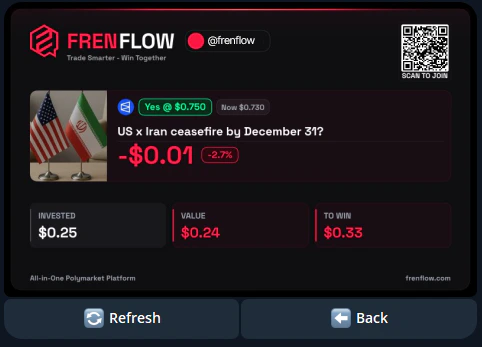
Generate PnL cards from the bot too:
1. Use `/positions` and select a position
2. Tap the **PnL Card** option
3. The bot generates and sends you the image
4. Forward it to any chat, group, or channel
You can also generate overall stats PnL cards from the bot's main menu.
**How to generate:**
1. Go to your **Profile** page
2. Click the **Share Stats** button
3. Choose your time period
4. Download or share
## Posting to the Social Feed
After any trade, you can share it to the FrenFlow feed:
After buying or selling, the confirmation screen appears.
The share button opens a post composer.
Write your reasoning, prediction, or analysis (up to 1,000 characters).
Your trade + commentary appears in the public feed and your followers' feed.
## From Telegram
Generate PnL cards from the bot too:
1. Use `/positions` and select a position
2. Tap the **PnL Card** option
3. The bot generates and sends you the image
4. Forward it to any chat, group, or channel
You can also generate overall stats PnL cards from the bot's main menu.
 ## Sharing on X (Twitter)
PnL cards are optimized for social media. When you download one:
* **Resolution** — High-res, looks sharp on any platform
* **Branding** — FrenFlow logo + your username included
* **Format** — Ready to post as an image tweet
Winning trades get the most engagement. Share your best calls to build followers both on FrenFlow and X.
## Earn Points by Sharing
Every post you create on the FrenFlow feed earns Fren Points. Likes on your posts earn you even more. Sharing is both social and rewarding.
## Sharing on X (Twitter)
PnL cards are optimized for social media. When you download one:
* **Resolution** — High-res, looks sharp on any platform
* **Branding** — FrenFlow logo + your username included
* **Format** — Ready to post as an image tweet
Winning trades get the most engagement. Share your best calls to build followers both on FrenFlow and X.
## Earn Points by Sharing
Every post you create on the FrenFlow feed earns Fren Points. Likes on your posts earn you even more. Sharing is both social and rewarding.