> ## Documentation Index
> Fetch the complete documentation index at: https://docs.frenflow.com/llms.txt
> Use this file to discover all available pages before exploring further.
# Copy Trading on Telegram
> Set up and manage copy trading entirely from the FrenFlow Telegram Bot. Follow traders, configure settings, and monitor copies.
 ## Overview
Everything you can do with copy trading on the website is also available from the Telegram Bot — browse traders, configure copy settings, manage leaders, and get real-time notifications.
## 1. Browse the Leaderboard
Use `/leaders` to open the trader leaderboard in Telegram.
You'll see top traders ranked with:
* PnL (profit)
* Volume
* Win rate
* Number of copiers
## Overview
Everything you can do with copy trading on the website is also available from the Telegram Bot — browse traders, configure copy settings, manage leaders, and get real-time notifications.
## 1. Browse the Leaderboard
Use `/leaders` to open the trader leaderboard in Telegram.
You'll see top traders ranked with:
* PnL (profit)
* Volume
* Win rate
* Number of copiers
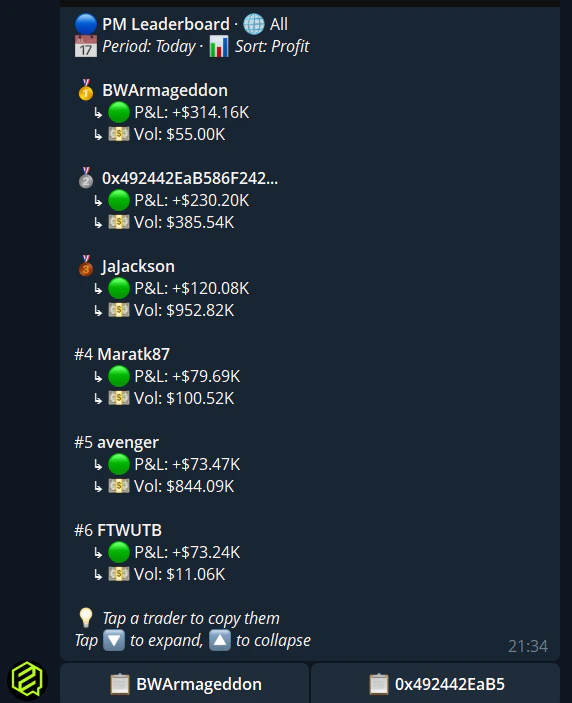
Use the **Sort** buttons to switch between profit and volume ranking. Navigate pages with the pagination buttons.
## 2. Start Copying a Trader
Tap on any trader in the `/leaders` list to see their stats.
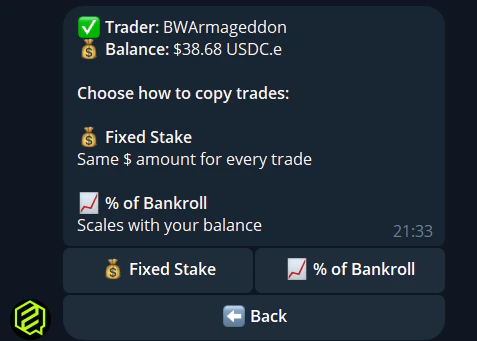
Choose to start copying their trades.
* **Fixed** — Same dollar amount per trade (e.g., \$10)
* **Percentage** — Percentage of your balance per trade (e.g., 5%)
Enter the dollar amount or percentage depending on your chosen mode.
Choose how to handle when the leader sells:
* **Mirror** — Exact same action
* **Same percentage** — Match their sell percentage
* **Sell all** — Close your full position
* **Manual** — You handle exits yourself
Review and confirm. Copy trading starts immediately.
 ## 3. Manage Your Leaders
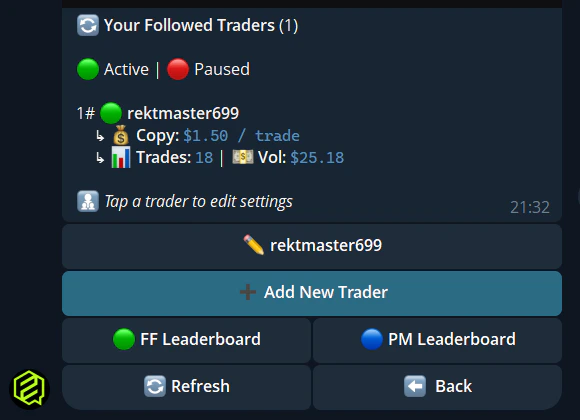
Use `/leaders` to see all traders you're currently copying. For each leader you can:
| Action | How |
| ----------------- | ---------------------------------------------------------- |
| **Edit settings** | Tap the leader → Configure → change mode, stake, sell mode |
| **Edit name** | Give the leader a custom display name |
| **View stats** | See their recent performance |
| **Stop copying** | Tap Delete to unfollow |
## 3. Manage Your Leaders
Use `/leaders` to see all traders you're currently copying. For each leader you can:
| Action | How |
| ----------------- | ---------------------------------------------------------- |
| **Edit settings** | Tap the leader → Configure → change mode, stake, sell mode |
| **Edit name** | Give the leader a custom display name |
| **View stats** | See their recent performance |
| **Stop copying** | Tap Delete to unfollow |
 ## 4. Advanced Settings
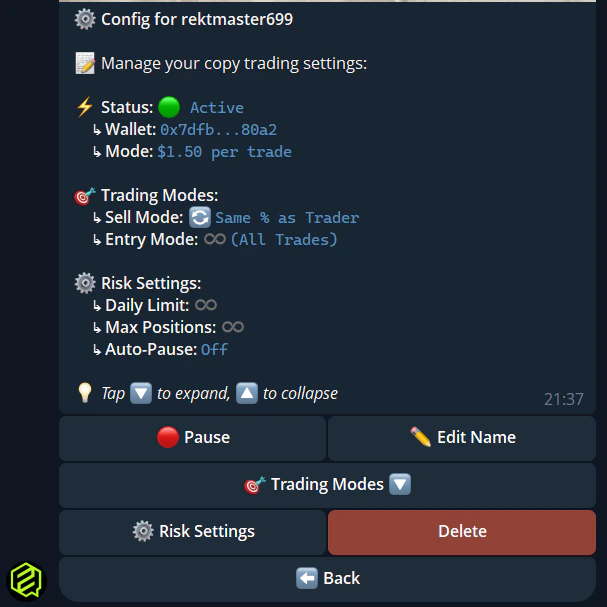
From the leader configuration menu, you can also set:
* **Entry mode** — Copy all entries, first only, or set a max
* **Max per trade** — Hard cap on any single copy trade
* **Max daily volume** — Limit total daily copy volume
* **Max open positions** — Cap simultaneous positions
* **Budget cap** — Hard cap on total capital deployed
* **Trade size filter** — Min/max trade size to copy
* **Per event / max events** — Control exposure per event and total events open
* **Auto-pause on loss %** — Stop copying if losses exceed a threshold
* **Auto-pause on profit %** — Stop copying when profit target is reached
* **Daily / weekly loss limit** — Pause copying at daily or weekly loss caps
* **Max slippage** — Price tolerance for copies
## 4. Advanced Settings
From the leader configuration menu, you can also set:
* **Entry mode** — Copy all entries, first only, or set a max
* **Max per trade** — Hard cap on any single copy trade
* **Max daily volume** — Limit total daily copy volume
* **Max open positions** — Cap simultaneous positions
* **Budget cap** — Hard cap on total capital deployed
* **Trade size filter** — Min/max trade size to copy
* **Per event / max events** — Control exposure per event and total events open
* **Auto-pause on loss %** — Stop copying if losses exceed a threshold
* **Auto-pause on profit %** — Stop copying when profit target is reached
* **Daily / weekly loss limit** — Pause copying at daily or weekly loss caps
* **Max slippage** — Price tolerance for copies
 ## 5. Copy Trade Notifications
When a copy trade executes, the bot sends you a DM with:
* Market name and outcome (Yes/No)
* Amount invested and shares received
* Leader who triggered the trade
* Current market price
Configure which notifications you receive with `/notifications`.
## Quick Reference
```
/leaders — Leaderboard + your followed traders
/follow @user — Quick follow a trader
/unfollow @user — Stop copying a trader
/positions — See positions (including copies)
/stats — Trading stats including copy volume
```
Copy trading settings are **synced** between web and Telegram. Change your stake on the website and it's reflected in Telegram, and vice versa.
## 5. Copy Trade Notifications
When a copy trade executes, the bot sends you a DM with:
* Market name and outcome (Yes/No)
* Amount invested and shares received
* Leader who triggered the trade
* Current market price
Configure which notifications you receive with `/notifications`.
## Quick Reference
```
/leaders — Leaderboard + your followed traders
/follow @user — Quick follow a trader
/unfollow @user — Stop copying a trader
/positions — See positions (including copies)
/stats — Trading stats including copy volume
```
Copy trading settings are **synced** between web and Telegram. Change your stake on the website and it's reflected in Telegram, and vice versa.