> ## Documentation Index
> Fetch the complete documentation index at: https://docs.frenflow.com/llms.txt
> Use this file to discover all available pages before exploring further.
# Customize Your Degenbox
> Add, remove, and rearrange events on your Degenbox dashboard. Personalize your prediction market trading experience.
 ## Adding Markets
Click the **+** button to open the search modal. You can add:
* **Individual markets** — A specific Yes/No question (e.g., "BTC above \$100K by June?")
* **Events** — An entire event with multiple related markets (e.g., "2026 Presidential Election")
Search by name or topic and click to add.
## View Options
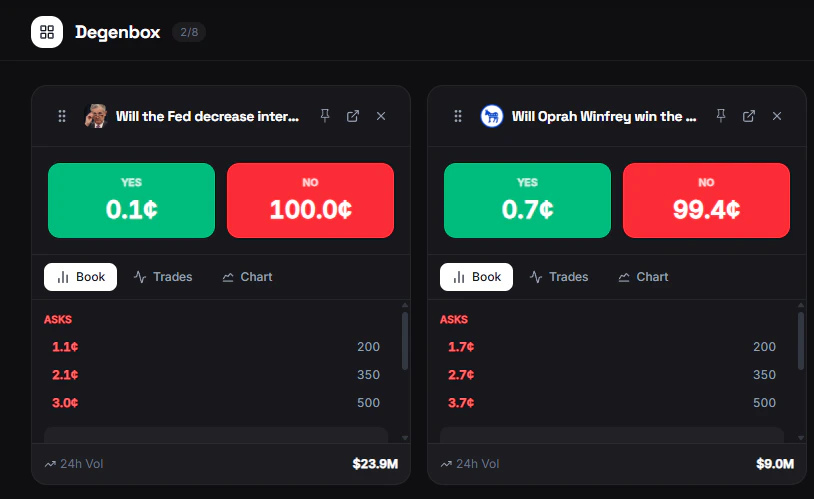
Each market card has three view modes. Click the toggle to switch:
| View | What it shows |
| ------------- | ---------------------------------------- |
| **Orderbook** | Live bid/ask depth for the market |
| **Trades** | Recent trade history with price and size |
| **Chart** | Price chart showing historical movement |
## Rearranging
Drag and drop market cards to reorder them. Put your most important markets at the top.
## Removing Markets
Click the remove button on any card to take it off your Degenbox. You can always add it back later.
## Adding Markets
Click the **+** button to open the search modal. You can add:
* **Individual markets** — A specific Yes/No question (e.g., "BTC above \$100K by June?")
* **Events** — An entire event with multiple related markets (e.g., "2026 Presidential Election")
Search by name or topic and click to add.
## View Options
Each market card has three view modes. Click the toggle to switch:
| View | What it shows |
| ------------- | ---------------------------------------- |
| **Orderbook** | Live bid/ask depth for the market |
| **Trades** | Recent trade history with price and size |
| **Chart** | Price chart showing historical movement |
## Rearranging
Drag and drop market cards to reorder them. Put your most important markets at the top.
## Removing Markets
Click the remove button on any card to take it off your Degenbox. You can always add it back later.