> ## Documentation Index
> Fetch the complete documentation index at: https://docs.frenflow.com/llms.txt
> Use this file to discover all available pages before exploring further.
# Copy Trading on FrenFlow
> Automatically mirror top traders' prediction market moves. How copy trading works, real-time execution, and zero-block technology.
## What is Copy Trading?
Copy trading lets you automatically mirror the trades of top performers. When a leader buys or sells on Polymarket, FrenFlow detects the trade in real-time and executes the same trade in your account — within seconds.
 ## How It Works
Browse the [Leaderboard](/leaderboard/overview) or visit a trader's profile. Look at their PnL, win rate, and trading history.
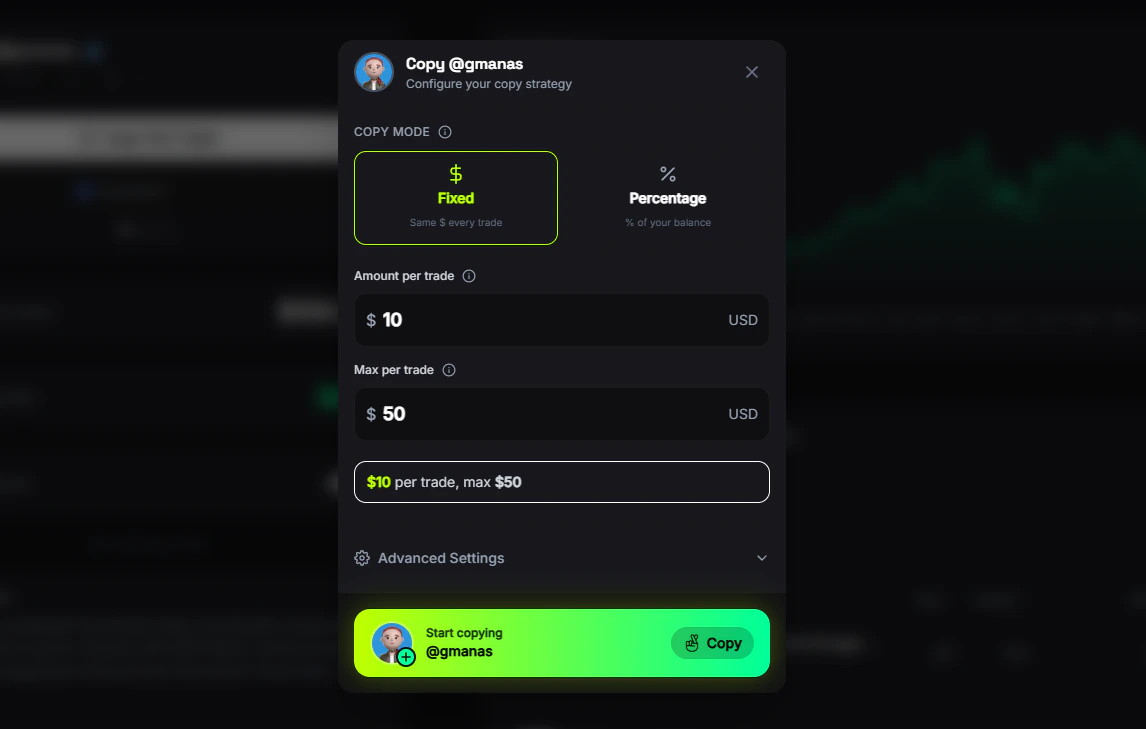
Set how much to invest per trade — a fixed dollar amount or a percentage of your balance. Set risk limits and sell preferences. See [Settings](/copy-trading/settings) for all options.
Click **Copy Trader** on their profile. FrenFlow begins monitoring their trades in real-time.
When the leader trades, FrenFlow detects it and places the same trade in your account. You get notified of every copy.
## The Pipeline
FrenFlow uses multiple detection methods running simultaneously to catch leader trades as fast as possible:
The fastest detection wins. Three methods race simultaneously:
| Method | Speed | How |
| ------------------- | --------------- | ------------------------------------------------------ |
| **Mempool Monitor** | \~0–5s early | Catches pending transactions before block confirmation |
| **CLOB Stream** | Instant on fill | Detects when the order fills on the exchange |
| **On-chain Logs** | On confirmation | Reads confirmed blockchain events |
The first detection triggers the copy. Duplicates are automatically prevented — if two methods detect the same trade, only the first one executes.
## What Gets Copied
| Action | Copied? |
| ------------------------- | --------------------------------------------------------- |
| **Buy (new position)** | Yes — automatically |
| **Buy (add to position)** | Configurable — copy all entries, first only, or set a max |
| **Sell (partial)** | Configurable — mirror percentage, fixed amount, or manual |
| **Sell (full exit)** | Configurable — auto-close or manage manually |
## Safety Features
If the price moves too much between the leader's trade and your copy, the trade is skipped. Tiered slippage lets you set different tolerances by token price range.
Every copy trade checks your balance first. If you don't have enough USDC, the trade is skipped and you're notified.
Set daily volume caps, budget limits on total deployed capital, and per-event exposure limits.
Automatically pause copying when losses or profits exceed your thresholds — by percentage, daily amount, or weekly amount.
Set min/max trade sizes to only copy trades within a specific range. Ignore dust trades and outsized moves.
Limit how many events you're exposed to simultaneously and cap your spend per event.
## Requirements
Before you can copy trade, you need:
1. **Trading enabled** — Go to Settings → Trading and enable trading (one-time setup)
2. **USDC balance** — Fund your wallet with enough USDC to cover trades
3. **A leader to follow** — Find one on the [Leaderboard](/leaderboard/overview) or [follow a trader](/copy-trading/follow-a-leader) from their profile
## How It Works
Browse the [Leaderboard](/leaderboard/overview) or visit a trader's profile. Look at their PnL, win rate, and trading history.
Set how much to invest per trade — a fixed dollar amount or a percentage of your balance. Set risk limits and sell preferences. See [Settings](/copy-trading/settings) for all options.
Click **Copy Trader** on their profile. FrenFlow begins monitoring their trades in real-time.
When the leader trades, FrenFlow detects it and places the same trade in your account. You get notified of every copy.
## The Pipeline
FrenFlow uses multiple detection methods running simultaneously to catch leader trades as fast as possible:
The fastest detection wins. Three methods race simultaneously:
| Method | Speed | How |
| ------------------- | --------------- | ------------------------------------------------------ |
| **Mempool Monitor** | \~0–5s early | Catches pending transactions before block confirmation |
| **CLOB Stream** | Instant on fill | Detects when the order fills on the exchange |
| **On-chain Logs** | On confirmation | Reads confirmed blockchain events |
The first detection triggers the copy. Duplicates are automatically prevented — if two methods detect the same trade, only the first one executes.
## What Gets Copied
| Action | Copied? |
| ------------------------- | --------------------------------------------------------- |
| **Buy (new position)** | Yes — automatically |
| **Buy (add to position)** | Configurable — copy all entries, first only, or set a max |
| **Sell (partial)** | Configurable — mirror percentage, fixed amount, or manual |
| **Sell (full exit)** | Configurable — auto-close or manage manually |
## Safety Features
If the price moves too much between the leader's trade and your copy, the trade is skipped. Tiered slippage lets you set different tolerances by token price range.
Every copy trade checks your balance first. If you don't have enough USDC, the trade is skipped and you're notified.
Set daily volume caps, budget limits on total deployed capital, and per-event exposure limits.
Automatically pause copying when losses or profits exceed your thresholds — by percentage, daily amount, or weekly amount.
Set min/max trade sizes to only copy trades within a specific range. Ignore dust trades and outsized moves.
Limit how many events you're exposed to simultaneously and cap your spend per event.
## Requirements
Before you can copy trade, you need:
1. **Trading enabled** — Go to Settings → Trading and enable trading (one-time setup)
2. **USDC balance** — Fund your wallet with enough USDC to cover trades
3. **A leader to follow** — Find one on the [Leaderboard](/leaderboard/overview) or [follow a trader](/copy-trading/follow-a-leader) from their profile